
A 2-in-1 laptop earns its name only if the second mode is genuinely useful: a screen that folds flat for notes, a keyboard that detaches for a long flight, or a second display that travels with you. We researched six current machines for this guide, checking manufacturer specifications, retailer listings and published expert reviews for each one. Two of them cleared the bar we apply to every buying link on this site: an exact configuration whose Amazon listing we could verify from two independent non-Amazon sources, so the button you click lands on precisely the machine described. Those two get full reviews and buy buttons below.
The other four machines are still covered, in prose, further down the page. They are good laptops; some are excellent. What they do not have, at the time of writing, is a listing we could verify to that standard: in one case two different sources printed two different ASINs for the same configuration, and in the others no verifiable exact-variant listing could be confirmed at all. Rather than guess, we tell you what each machine does well and what to check before you buy it elsewhere. This guide is based on published specifications and third-party reviews, not hands-on testing, and it says so wherever a figure is a manufacturer rating rather than a measurement.
The short answer
Buy the ASUS Zenbook Duo (2025) if your work lives in split screen. It is the only machine here with two full 14-inch OLED touchscreens, a proper flagship processor, 32GB of memory and the keyboard, pen and sleeve all in the box. Nothing else on this page, or most pages, does what it does.
Buy the Microsoft Surface Pro 12 (2025) if you want the lightest possible Windows machine. At 686 grams it is a true tablet that docks into a laptop, with a sharp 90Hz screen and all-day rated battery life. Just budget for the keyboard, which is sold separately and is not optional in practice.
Read the prose sections before buying anything else. The HP Spectre x360 14 and Lenovo Yoga 9i remain the two best conventional convertibles we researched, and the HP Envy x360 14 and Lenovo IdeaPad Flex 5i cover the mid-range and budget tiers. They are discussed in full below, with the checks to run on any listing you find.
Quick Picks
The two verified picks, side by side
| Specification | ASUS Zenbook Duo (2025) | Microsoft Surface Pro 12 (2025) |
|---|---|---|
| Form factor | Dual-screen laptop with detachable Bluetooth keyboard and kickstand | Detachable tablet; keyboard sold separately |
| Display | Two 14-inch OLED touchscreens, 2880 x 1800 each, 120Hz, 500-nit HDR peak, 100% DCI-P3 | 12-inch PixelSense LCD touch, 2196 x 1464, 90Hz, 400 nits |
| Processor | Intel Core Ultra 9 285H (16 cores) | Qualcomm Snapdragon X Plus (8 cores), 45-TOPS NPU |
| Memory | 32GB LPDDR5X (soldered) | 16GB LPDDR5x (soldered) |
| Storage | 1TB PCIe 4.0 SSD | 256GB UFS |
| Weight | 1.65 kg (3.64 lb) with keyboard | 686 g (1.5 lb), tablet only |
| Battery | 75Wh; ASUS rates up to 18.5 hours single-screen video, 10 hours dual-screen | Up to 16 hours video playback (manufacturer rating) |
| Pen | ASUS Pen 2.0 included in the box | Surface Slim Pen sold separately; stores and charges on the back of the tablet |
| Ports | 2x Thunderbolt 4, USB-A 3.2, HDMI 2.1, 3.5mm audio | 2x USB-C 3.2 (no Thunderbolt) |
| Amazon Link | Check Price on Amazon | Check Price on Amazon |
Battery figures are manufacturer ratings, not our measurements, and weights are for the exact configurations linked. The two machines barely compete with each other: the Zenbook Duo is a mobile workstation that happens to fold, and the Surface Pro 12 is a tablet that happens to run full Windows. The comparison that matters is each one against the job you actually do all day.
Best dual-screen 2-in-1
ASUS Zenbook Duo (2025) UX8406CA-PS99T
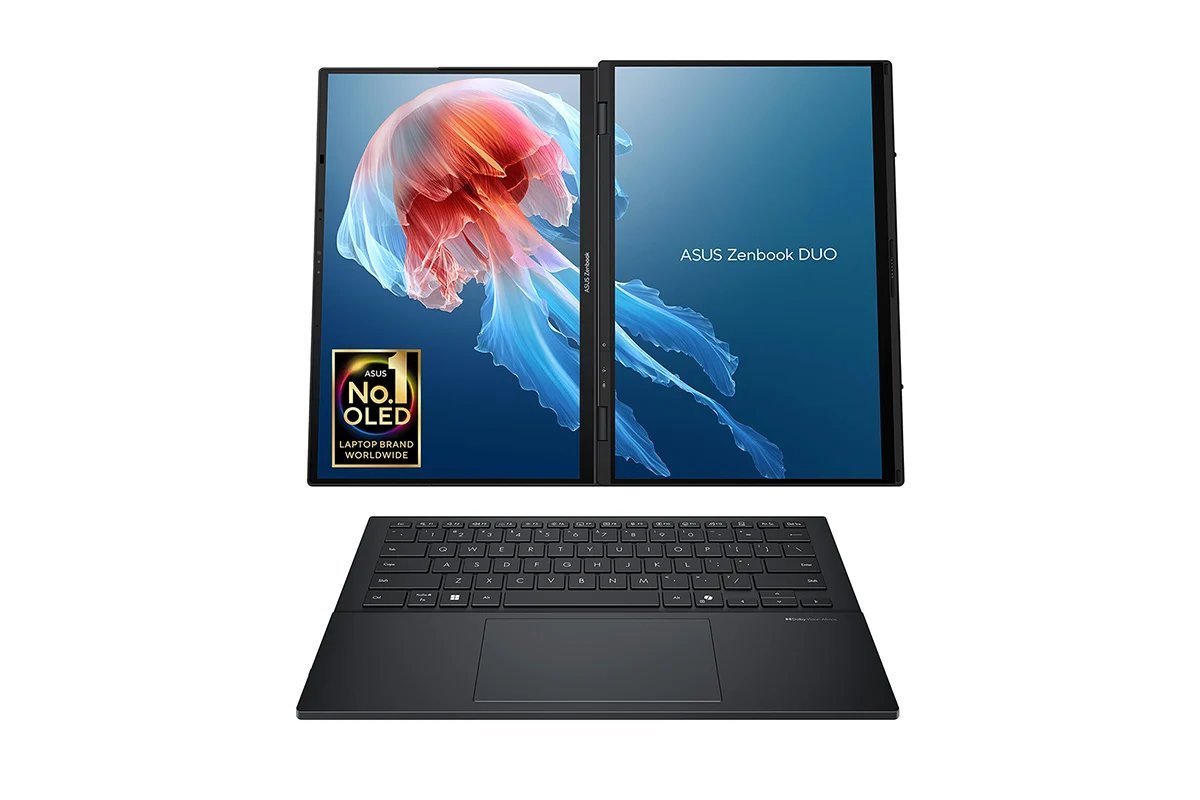
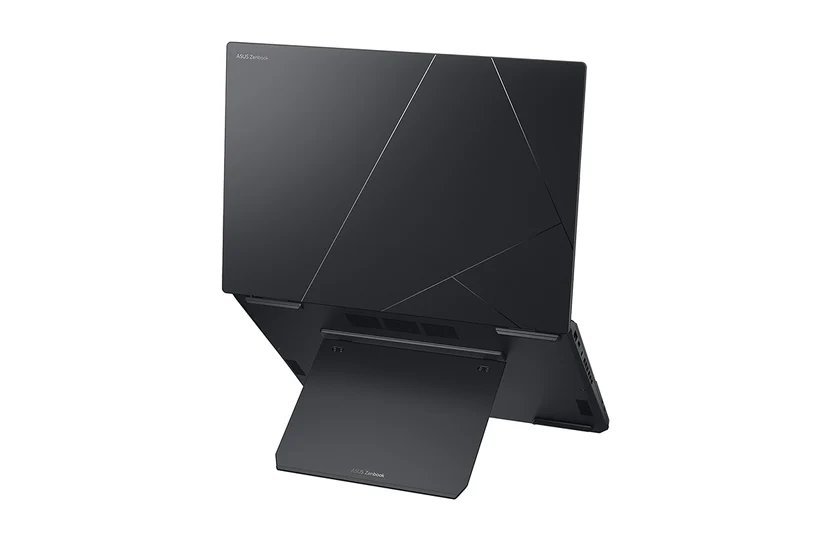
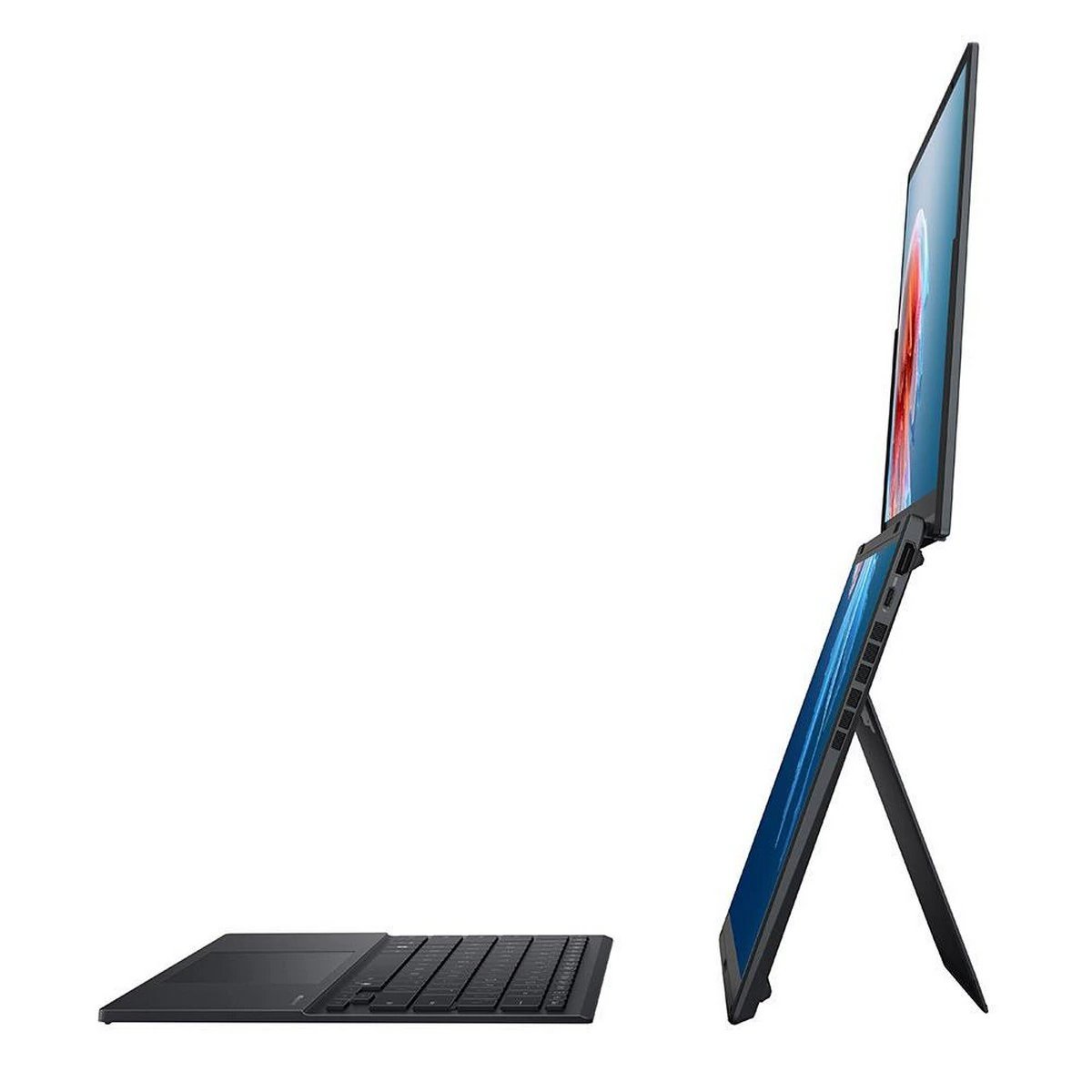
The Zenbook Duo is the most distinctive 2-in-1 on sale: two full-size 14-inch OLED touchscreens joined by a lay-flat hinge, a detachable Bluetooth keyboard, and a built-in kickstand. The exact configuration linked here is the flagship UX8406CA-PS99T: Intel Core Ultra 9 285H, 32GB of LPDDR5X memory, a 1TB PCIe 4.0 SSD, and dual 3K (2880 x 1800) 120Hz OLED panels in Inkwell Gray. If you currently plug a laptop into a second monitor and wish the second monitor would travel, this is the machine built for you.
Each display is an ASUS Lumina OLED panel: 2880 x 1800 resolution, a 120Hz refresh rate, 100% DCI-P3 colour, Pantone validation and a 500-nit HDR peak. Opened together they give you up to 19.8 inches of combined workspace. Work modes cover most desk setups: dual-screen mode with the keyboard detached in front of you, desktop mode with the screens stacked vertically for documents and code, laptop mode with the keyboard snapped over the lower screen, and a sharing mode that lays both panels flat on a table. ASUS's ScreenXpert software adds gesture controls, including a six-finger tap that summons a full-size virtual keyboard and touchpad on the lower panel. The performance side is not a compromise made for the form factor: the Core Ultra 9 285H is a 16-core flagship chip with Intel Arc graphics and a 13-TOPS NPU, backed by 32GB of memory, which is the configuration to buy in a machine whose RAM can never be upgraded. Connectivity is complete for a thin laptop: two Thunderbolt 4 ports (one on each side on this generation), a USB-A 3.2 port, HDMI 2.1 and a 3.5mm audio jack, plus Wi-Fi 7.
The trade-offs are honest ones. At 1.65 kg with its keyboard, the Duo is the heaviest machine in this guide, and two OLED panels draw power faster than one: ASUS rates it for up to 18.5 hours of local video playback on a single screen but up to 10 hours in dual-screen video playback, and less for web browsing, so heavy dual-screen days still end near a charger. The detachable keyboard is good but has less key travel than a fixed laptop keyboard, and the 75Wh battery feeds a 65W USB-C charger that is included, along with the ASUS Pen 2.0 (4,096 pressure levels) and a sleeve. None of this makes the Duo a general recommendation; it makes it a specialist tool that is genuinely best in class for one specific, common job: serious multitasking away from a desk monitor.
- Two full 14-inch 3K OLED touchscreens: up to 19.8 inches of workspace that travels
- Flagship Core Ultra 9 285H with 32GB RAM and 1TB SSD in the linked configuration
- Keyboard, ASUS Pen 2.0, sleeve and 65W charger all included in the box
- Full port selection: 2x Thunderbolt 4, USB-A, HDMI 2.1 and audio jack
- Panels are Pantone validated with 100% DCI-P3, good enough for colour-aware work
Reasons to avoid:
- Heaviest pick here at 1.65 kg with the keyboard attached
- Dual-screen use cuts rated battery life roughly in half versus single-screen use
- Detachable keyboard has shallower key travel than a fixed laptop keyboard
- Premium pricing: you are paying for the second screen, so buy it only if you will use it daily
- Model: ASUS Zenbook Duo (2025), UX8406CA-PS99T, Inkwell Gray
- Displays: 2x 14-inch OLED touch, 2880 x 1800, 120Hz, 500-nit HDR peak, 100% DCI-P3, Pantone validated
- Processor: Intel Core Ultra 9 285H, 16 cores, Intel AI Boost NPU up to 13 TOPS
- Graphics: Intel Arc (integrated)
- Memory: 32GB LPDDR5X, soldered
- Storage: 1TB M.2 PCIe 4.0 SSD
- Battery: 75Wh, 65W USB-C charger included
- Weight: 1.65 kg (3.64 lb) with keyboard; 12.34 x 8.58 x 0.57 to 0.78 inches
- Ports: 2x Thunderbolt 4, 1x USB-A 3.2 Gen 1, 1x HDMI 2.1 (TMDS), 3.5mm audio
- Wireless: Wi-Fi 7, Bluetooth 5.4
- In the box: detachable Bluetooth keyboard, ASUS Pen 2.0, sleeve, 65W adapter
Best for: multitaskers who live in split screen, including coders, researchers, writers, traders and students who take notes beside their reading, and anyone who currently travels with a portable monitor.
Best detachable 2-in-1
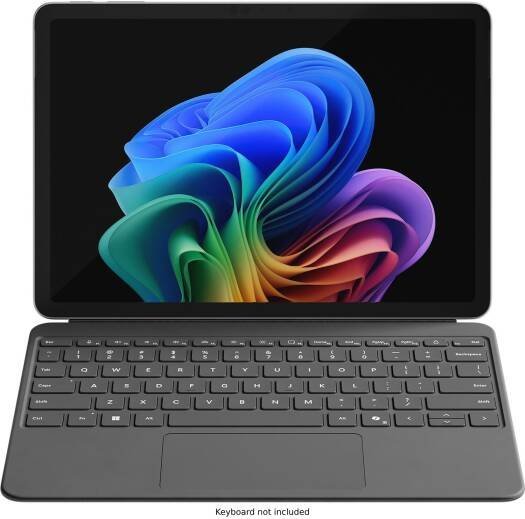
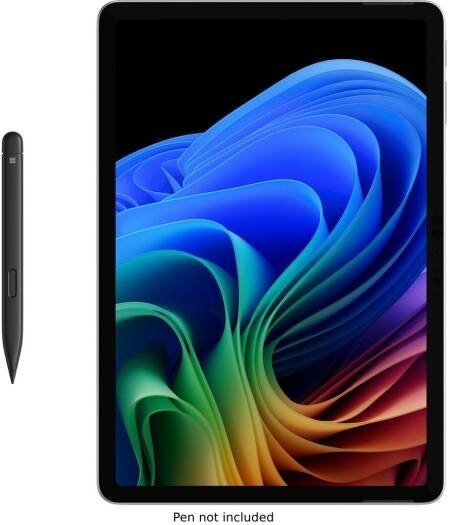
Microsoft Surface Pro 12 (2025), Platinum, 16GB / 256GB
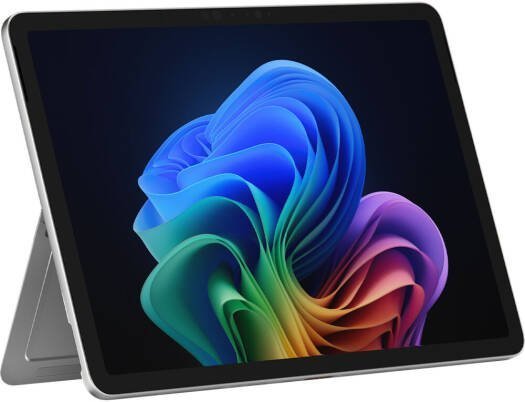
The Surface Pro 12 takes the opposite approach to the Zenbook Duo: instead of adding screens, it removes everything it can. The keyboard detaches completely, leaving a 12-inch Windows tablet that weighs 686 grams. The exact configuration linked here is model EP2-33670 in Platinum: Snapdragon X Plus (8-core), 16GB of LPDDR5x memory and 256GB of storage, running Windows 11 Home. If "tablet that can do laptop things" is what you actually want, this form factor beats every 360-degree convertible on this page.
The 12-inch PixelSense LCD runs at 2196 x 1464 with a 90Hz dynamic refresh rate and 400 nits of brightness. That is 220 pixels per inch, so text stays sharp at reading distance, and the 90Hz panel feels noticeably smoother than a 60Hz screen when scrolling or inking. Performance comes from Qualcomm's 8-core Snapdragon X Plus, a Copilot+ PC chip with a 45-TOPS NPU for on-device AI features, paired with 16GB of memory. Microsoft rates the tablet for up to 16 hours of local video playback, and the built-in kickstand folds out to 165 degrees, so the tablet stands at almost any angle without a case. The Slim Pen stores and charges in a cradle on the back of the tablet, which is the neatest pen solution in this guide. Connectivity is the deliberate weak point: two USB-C 3.2 ports and nothing else, with no Thunderbolt and no USB-A, so dock and adapter choices matter.
Price the whole kit before comparing. The Surface Pro 12-inch Keyboard is sold separately, the Slim Pen is sold separately, and no charger is included in the box beyond a USB-C cable, so the headline tablet price understates the real cost of the laptop replacement most people are buying. Storage is UFS rather than NVMe SSD, which is slower on large transfers, and the 16GB of memory is soldered and final. The ARM processor also carries the standing Windows-on-ARM caveat: most mainstream apps now run natively or emulate well, but a small number of specialist applications, drivers and games still have issues, so check your must-have software before you buy. None of that dents the core appeal: this is the lightest full-Windows device in the guide by a factor of two, and for commuters, students and note-takers that is the spec that decides the purchase.
- True tablet weight: 686 g, half the weight of any convertible here
- Sharp 2196 x 1464 PixelSense display at 90Hz with pen support
- Copilot+ PC with a 45-TOPS NPU and up to 16 hours rated video playback
- Kickstand built in, and the Slim Pen stores and charges on the back of the tablet
- Fanless, silent design in reviewer reports, with a premium Platinum finish
Reasons to avoid:
- Keyboard, pen and a full charger are all separate purchases; price the whole kit
- Only two USB-C 3.2 ports, with no Thunderbolt, USB-A or HDMI
- 256GB UFS storage is slower than an NVMe SSD and cannot be upgraded
- Some specialist Windows apps and drivers still struggle on ARM processors
- Model: Microsoft Surface Pro 12 (2025), EP2-33670, Platinum
- Display: 12-inch PixelSense LCD touch, 2196 x 1464, 90Hz dynamic, 400 nits, Gorilla Glass 5
- Processor: Qualcomm Snapdragon X Plus (8-core), Hexagon NPU 45 TOPS
- Memory: 16GB LPDDR5x, soldered
- Storage: 256GB UFS
- Weight: 686 g (1.5 lb), tablet only
- Battery: up to 16 hours video playback (manufacturer rating)
- Ports: 2x USB-C 3.2 with charging, data and DisplayPort 1.4a output
- Wireless: Wi-Fi 7, Bluetooth 5.4
- Operating system: Windows 11 Home
- Sold separately: Surface Pro 12-inch Keyboard, Surface Slim Pen, power supply
Best for: commuters, students and note-takers who value minimum weight and genuine tablet ergonomics over raw performance, and who will use the pen and kickstand daily.
Four more 2-in-1s we researched, covered in prose
The four machines below earned their place in our research on specifications and published reviews. They carry no buy buttons in this guide because we could not verify an exact-variant Amazon listing for them to the dual-source standard described in the introduction. Each section tells you what the machine does well and the specific check to run on any listing before you buy.
HP Spectre x360 14 (2024): the best conventional convertible we researched
The Spectre x360 14 is the convertible we would point most buyers at if a verified listing existed: it nails the fundamentals. The 14-inch 2.8K (2880 x 1800) OLED touchscreen runs at a 120Hz adaptive refresh rate with roughly 400 nits typical brightness and 100% DCI-P3 coverage, and the aluminum chassis flips a full 360 degrees into tent, stand and tablet modes. The 2024 model runs Intel's Core Ultra 7 155H with up to 32GB of LPDDR5x memory and up to 2TB of PCIe Gen4 storage, carries a 68Wh battery at about 1.44 kg, and keeps a port set most thin laptops have abandoned: two Thunderbolt 4 ports, USB-A, HDMI 2.1 and a 3.5mm jack. A 9MP IR webcam and Wi-Fi 7 round out a spec sheet with no obvious weakness. The check: we found two different ASINs printed by two different sources for the same 155H / 16GB / 1TB configuration, and seller-upgraded listings blur the panel and memory specs, so verify the exact model number (the 14-eu series) and panel type on any listing before buying.
Lenovo Yoga 9i 2-in-1 Gen 10 (Aura Edition): the premium pen convertible
The Yoga 9i Gen 10 is the Spectre's closest rival and the brighter of the two: its 14-inch 2.8K OLED touchscreen reaches 500 nits SDR and 1,100 nits HDR with a 120Hz adaptive refresh. Inside is Intel's Core Ultra 7 258V (Lunar Lake) with Arc 140V graphics and up to 32GB of LPDDR5X-8533 memory, a 75Wh battery, and a chassis that weighs just 1.32 kg. Lenovo includes the Yoga Pen in the box, the 360-degree hinge doubles as a rotating soundbar, and reviewers praise the build rigidity while noting audible fans under sustained load and a lower core count than the Spectre's H-series chip. The check: buy the Gen 10 convertible (83LC series), not the similarly named Yoga Slim 9i clamshell, and confirm the pen is in the box for the specific listing, since inclusion varies by retailer and region.
HP Envy x360 14: the mid-range pick, with one big caveat
The Envy x360 14 is HP's step down from the Spectre and the smart mid-range buy on paper: a 360-degree aluminum hinge, Intel Core Ultra 7 configurations with 16GB of memory and 1TB of storage at about 1.39 kg, and, on the right configuration, a 14-inch 2.8K OLED touchscreen with a 48 to 120Hz variable refresh rate and 100% DCI-P3 colour. That OLED option brings flagship display quality to mid-range money. The check: it is also the trap. Budget configurations of the same model name ship with a WUXGA (1920 x 1200) IPS panel instead, and retailers mix the two freely. The model name alone will not tell you which screen you are getting; confirm the exact panel in the configuration's specification list before you pay.
Lenovo IdeaPad Flex 5i: the budget pick that includes the pen
The Flex 5i is the value play, and a generous one. The configuration our research focused on pairs Intel's Core Ultra 5 225U with 16GB of LPDDR5X memory and a 1TB SSD behind a 16-inch WUXGA (1920 x 1200) IPS touchscreen at 300 nits, with the Lenovo Digital Pen 2 included in the box, a 1080p IR webcam with a privacy shutter, MIL-STD-810H durability testing and a rated battery life of up to about 9.5 hours. The 16-inch model weighs about 4.41 lb, so it is the bulkiest machine here, and the IPS panel is dim next to the OLEDs above. The check: smaller 14-inch configurations exist with weaker processors and less memory, so confirm the CPU, screen size and pen inclusion on the exact configuration, not the model family.
How to choose a 2-in-1 laptop
Pick the form factor first. There are three types. Convertibles with a 360-degree hinge (the Spectre, Yoga 9i, Envy and Flex 5i above) keep a full keyboard and full ports, at the cost of carrying the keyboard's weight in tablet mode; this is the right default for most buyers. Detachables like the Surface Pro 12 remove the keyboard entirely for a true tablet, and are best when tablet use dominates. Dual-screen machines like the Zenbook Duo are built for multitasking rather than tablet use, and are a specialist choice.
Display second. On a machine you will fold into a tablet, the screen is the device. OLED panels deliver dramatically better contrast than IPS and are the priority if you watch video or edit photos; a good IPS panel is fine if you mostly type. Brightness matters more than resolution for use near windows: 400 nits or more is the comfortable threshold.
Price the whole kit. On detachables the keyboard is a separate purchase, and sometimes the pen and even the charger are too. Add everything before comparing against a convertible's price. Conversely, a pen included in the box (the Zenbook Duo, the Yoga 9i, the Flex 5i) is worth real money if handwriting matters to you.
Buy memory for year three. RAM is soldered and non-upgradeable on virtually every 2-in-1 in this guide. Sixteen gigabytes is the sensible floor; 8GB configurations exist to hit price points, not to serve you well over the machine's life. Thirty-two gigabytes is worth it for heavy multitasking or if you plan to keep the machine five years or more.
Mind the processor divide. The Surface Pro 12's Snapdragon chip is efficient and quiet, but a small number of Windows applications and drivers still do not run well on ARM. If you depend on specialist software, check its compatibility first, or choose an Intel machine. And whatever you buy, treat manufacturer battery figures as ratings under light test conditions, not promises: dual-screen use, bright OLED panels and video calls all cut them substantially.
Frequently asked questions
Yes, if you will actually use the tablet, tent or pen modes for note-taking, presenting, reading or sketching. If the machine will live on a desk as a laptop, a conventional clamshell gives you more performance, or a lower price, for the same money. The hinge is worth paying for only when the second mode earns its keep.
Sometimes. Of the two verified picks in this guide, the ASUS Zenbook Duo includes the ASUS Pen 2.0 in the box, while the Surface Pro 12's Slim Pen is a separate purchase that stores and charges on the back of the tablet. Among the prose picks, the Yoga 9i and Flex 5i typically include a pen and the Spectre and Envy usually do not, but inclusion varies by listing, so check the exact configuration.
A convertible keeps its keyboard permanently attached on a 360-degree hinge and folds the screen back for tablet mode: full ports and no extra purchases, but keyboard weight in tablet mode. A detachable removes the keyboard entirely for a lighter true tablet, but the keyboard is a separate purchase and ports are fewer. The Zenbook Duo's dual-screen design is a third answer to the same question, trading tablet use for workspace.
Sixteen gigabytes is the sensible minimum in 2026 because memory is soldered and cannot be upgraded later. Both verified picks meet that floor, the Surface Pro 12 at 16GB and the Zenbook Duo at 32GB. Choose 32GB for heavy multitasking, large creative projects, or a five-year ownership plan.
Final verdict
For the dual-screen multitasker, the ASUS Zenbook Duo (2025) is the most capable 2-in-1 we researched and the easiest recommendation in this guide: two superb OLED panels, flagship performance, and everything in the box. For the tablet-first traveller, the Microsoft Surface Pro 12 (2025) is the lightest full-Windows machine here, provided you budget for its keyboard. If your heart is set on a conventional convertible, the HP Spectre x360 14 and Lenovo Yoga 9i are the two to hunt down, with the HP Envy x360 14 and Lenovo IdeaPad Flex 5i covering the mid-range and budget tiers; run the checks in their sections before buying any of them.
Our verified picks: the ASUS Zenbook Duo (2025) UX8406CA-PS99T for dual-screen productivity