
Quick Picks
Short on time? These are our top recommendations. Each button takes you to the exact product on Amazon.
The short version: an MMORPG mouse is defined by one thing: a 12-button thumb keypad that puts your entire ability bar under your thumb. The Corsair Scimitar RGB Elite is the best overall pick: its 12-button grid slides 8mm to fit your thumb (the KeySlider), it uses a PMW3391 18K optical sensor, and it defaults to the keyboard's number row, so it works in World of Warcraft and Final Fantasy XIV with zero setup. The Razer Naga V2 Pro is the best wireless option (Focus Pro 30K sensor, interchangeable 12/6/2-button side plates). The Logitech G600 remains the budget classic (20 buttons, G-Shift modifier, 8200 DPI). The Razer Naga V2 HyperSpeed is the battery-life pick (up to 400 hours on Bluetooth), and the Redragon M908 Impact is the ultra-budget entry. Everything below is researched from manufacturer listings and third-party roundups; we did not hands-on test these mice.
The Direct Answer: Which MMORPG Mouse Should You Buy?
Buy the Corsair Scimitar RGB Elite if you want the best MMO mouse for most players. The adjustable 12-button thumb grid is the killer feature. Slide the KeySlider to match your thumb's reach, and the number-row default mapping means your WoW or FFXIV hotbar works the moment you plug it in. At 122g with a PMW3391 18K sensor, it is accurate, comfortable for long raids, and proven over years of MMO use.
Choose differently only for a specific reason:
- You want wireless: the Razer Naga V2 Pro: Focus Pro 30K sensor, swappable 12/6/2-button side plates, HyperSpeed wireless. The most versatile MMO mouse made.
- You want maximum battery life: the Razer Naga V2 HyperSpeed: up to 400 hours on Bluetooth with a fixed 12-button panel and 19 programmable controls.
- You are on a budget: the Logitech G600: the classic wired MMO mouse: 20 buttons, G-Shift doubles your keybinds, and it has been the value pick for over a decade.
- You want the cheapest workable option: the Redragon M908 Impact: a 12-button grid and 12,400 DPI sensor for a fraction of the flagship price.
The single biggest mistake buyers make with MMO mice is buying on DPI numbers. A 12,400 DPI sensor and a 30,000 DPI sensor feel identical at the sensitivities MMO players actually use (typically 800–3200 DPI). What matters is the thumb keypad: button reach, tactile separation between buttons, and whether your thumb can find button 7 blindfolded at 2 AM during a progression pull. The buying guide below explains what to actually evaluate.
| Pick | Mouse | Best for |
|---|---|---|
| Best Overall | Corsair Scimitar RGB Elite | Most MMO players; adjustable thumb grid, plug-and-play |
| Best Wireless | Razer Naga V2 Pro | Cable-free MMO with swappable side plates |
| Best Battery Life | Razer Naga V2 HyperSpeed | 400-hour Bluetooth; wireless without charging anxiety |
| Best Budget Classic | Logitech G600 | 20 buttons + G-Shift at a value price |
| Best Ultra-Budget | Redragon M908 Impact | Cheapest 12-button MMO layout that works |
Best MMORPG Mouse Comparison Table
| Scimitar RGB Elite | Naga V2 Pro | Naga V2 HyperSpeed | Logitech G600 | Redragon M908 | |
|---|---|---|---|---|---|
| Thumb buttons | 12 (KeySlider, 8mm adjustable) | 12 / 6 / 2 (swappable plates) | 12 (fixed) | 12 (angled grid) | 12 |
| Total buttons | 17 | 19+ programmable | 19 programmable | 20 | 19 macro buttons (per listings) |
| Sensor | PMW3391 18K optical | Focus Pro 30K optical | Focus Pro 30K optical | 8200 DPI laser | 12,400 DPI optical |
| Connection | Wired USB | HyperSpeed 2.4GHz + Bluetooth | 2.4GHz + Bluetooth | Wired USB (braided) | Wired USB |
| Battery | N/A (wired) | Rechargeable (wireless) | Up to 400 hrs (Bluetooth) | N/A (wired) | N/A (wired) |
| Weight | 122g | ~134g | Not published in sources | 133g (148g w/ cable) | Heavier (per listings) |
| Standout | Thumb-grid adjustability | Wireless + plate swapping | Battery life | G-Shift third click | Price |
| Best for | Most players | Wireless players | Long sessions, no charging | Budget veterans | Tightest budgets |
Specs compiled from manufacturer listings and third-party roundups. Weights and battery figures are manufacturer/listing figures. One honorable mention, the UtechSmart Venus Pro (budget wireless, 16,000 DPI), is covered in the reviews below.
| Product | Key Specs | Best Use Case | Standout Feature | Amazon Link |
|---|---|---|---|---|
| Corsair Scimitar RGB Elite Best Overall |
PMW3391 18K optical · 17 buttons · 122g · wired USB | Most MMO players; adjustable thumb grid, plug-and-play | KeySlider - the thumb grid slides 8mm to fit your thumb | Check Price |
| Razer Naga V2 Pro Best Wireless |
Focus Pro 30K optical · 19+ programmable · ~134g · HyperSpeed wireless | Cable-free MMO with swappable side plates | Swappable side plates - 12, 6 or 2 thumb buttons | Check Price |
| Razer Naga V2 HyperSpeed Best Battery Life |
Focus Pro 30K optical · 19 programmable · up to 400 hrs (Bluetooth) | 400-hour Bluetooth; wireless without charging anxiety | Battery life - up to 400 hours on Bluetooth | Check Price |
| Logitech G600 Best Budget Classic |
8200 DPI laser · 20 buttons · 133g · wired USB (braided) | 20 buttons + G-Shift at a value price | G-Shift third click doubles every binding | Check Price |
| Redragon M908 Impact Best Ultra-Budget |
12,400 DPI optical · 12-button grid · wired USB | Cheapest 12-button MMO layout that works | Price-to-buttons ratio | Check Price |
| UtechSmart Venus Pro Best Low-Cost Wireless |
16,000 DPI · 12-button grid · 2.4GHz wireless + wired | Budget wireless MMO keybinds | Wireless 12-button grid at a budget price | Check Price |
Detailed Reviews: The 6 Best MMORPG Mice
1. Corsair Scimitar RGB Elite: Best Overall
The Scimitar RGB Elite is the MMO mouse that reviewers keep coming back to. One long-term reviewer, who states they tried every MMO mouse on the market, calls it the best, citing the adjustable number pad as the deciding factor during long raids and dungeons. That is the Scimitar's whole argument in one sentence: the thumb grid fits you.
What stands out. The KeySlider: the entire 12-button side panel slides up to 8mm forward and back, so you position the grid exactly where your thumb rests. Thumb size and grip vary enormously between players, and a fixed grid that is perfect for one hand is a stretch for another; the slider solves the #1 ergonomic complaint about MMO mice. The buttons default to the keyboard's number row (1 through =), which means in World of Warcraft, where abilities are bound to the number row by default, it is genuinely plug-and-play. The PMW3391 18K optical sensor is a proven esports-grade sensor, the 122g weight is reasonable for a 17-button mouse, and four-zone RGB lets you color-code the thumb grid. Onboard profile storage means your keybinds travel with the mouse; plug it into any PC and your setup is there, no software needed.
Limitations: read these before buying. It is wired only; if you want wireless, the Naga V2 Pro is the answer (review #2). At 122g it is heavier than ultralight FPS mice, which matters if you also play shooters competitively (though for MMOs the weight is a non-issue). And the Scimitar's software (iCUE) is required for deep remapping; the plug-and-play default covers the number row, but custom macros need the software installed.
Who should buy it: MMO and MOBA players who want the best thumb-grid ergonomics available. Who should skip it: wireless-only players, and FPS-first players who want an ultralight mouse.


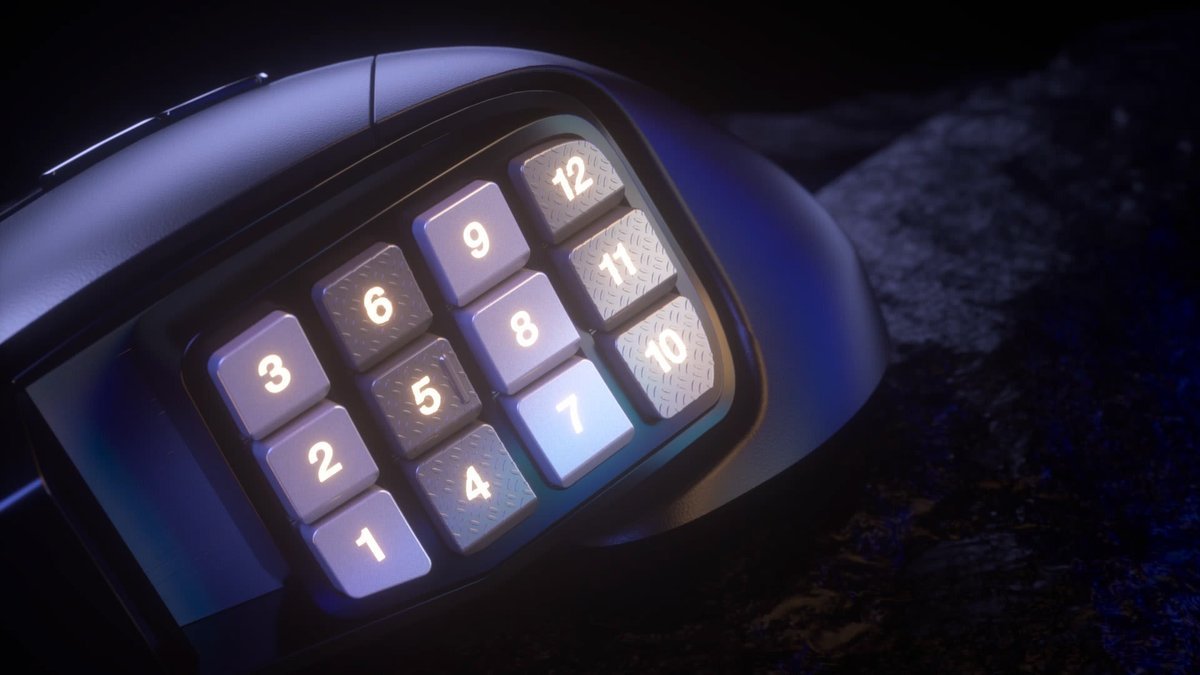
Corsair Scimitar RGB Elite
The 12-button thumb grid slides up to 8mm on Corsair's KeySlider, so it fits your thumb instead of the other way round. It defaults to the keyboard number row, making it plug-and-play in WoW and FFXIV.
- KeySlider thumb grid adjusts up to 8mm for thumb reach
- PMW3391 18K optical sensor
- Onboard profile storage - keybinds travel with the mouse
Important limitation: Wired only, and at 122g it is heavier than ultralight FPS mice; deep remapping needs Corsair's iCUE software.
- Sensor: PMW3391 18K optical
- Total buttons: 17
- Weight: 122g (without cable)
Best for: MMO and MOBA players who want the best thumb-grid ergonomics available.
2. Razer Naga V2 Pro: Best Wireless
The Naga V2 Pro is the flagship of the line that invented the MMO mouse category. Its defining feature is the interchangeable side plates: swap between 12-button, 6-button, and 2-button thumb panels in seconds.
What stands out. Versatility: the 12-button plate is the MMO configuration, the 6-button plate suits MOBAs and battle royales, and the 2-button plate turns it into a normal-ish gaming mouse for FPS days. No other MMO mouse adapts to different genres this way. The Focus Pro 30K optical sensor is Razer's flagship sensor, HyperSpeed wireless is effectively lag-free, and with 19+ programmable buttons it has the deepest keybind capacity here. At ~134g it is wireless without the usual wireless weight penalty.
Limitations. It is the priciest mouse in this guide: flagship wireless plus swappable plates costs flagship money. The side plates are proprietary; lose one and you are reordering from Razer. And while the 12-button plate is excellent, it does not slide like the Scimitar's KeySlider, so if the fixed grid does not match your thumb, there is no adjustment.
Who should buy it: players who want one mouse for MMOs and other genres, and who will pay for wireless. Who should skip it: budget buyers, and players whose thumb needs the Scimitar's adjustable grid.


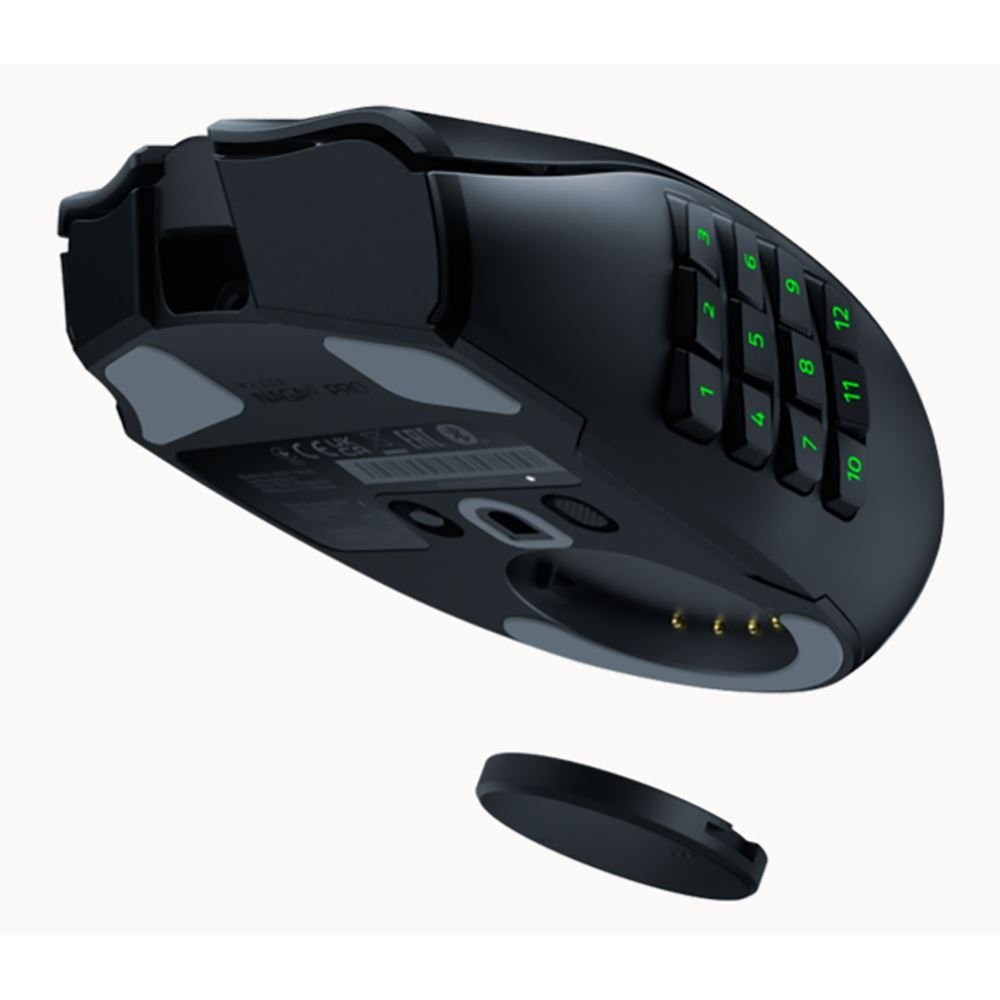
Razer Naga V2 Pro
Interchangeable 12/6/2-button side plates make it three mice in one - MMO, MOBA and FPS layouts on a single body. HyperSpeed wireless and the Focus Pro 30K sensor mean no performance compromise for cutting the cable.
- Swappable 12/6/2-button side plates
- Focus Pro 30K optical sensor
- 19+ programmable buttons - the deepest keybind capacity here
Important limitation: The priciest mouse in this guide, and the fixed 12-button plate does not slide like the Scimitar's KeySlider.
- Sensor: Focus Pro 30K optical
- Programmable buttons: 19+
- Weight: ~134g
Best for: Players who want one mouse for MMOs and other genres, and will pay for wireless.
3. Razer Naga V2 HyperSpeed: Best Battery Life
The Naga V2 HyperSpeed is the mid-range wireless Naga: a fixed 12-button thumb panel, 19 programmable controls, Focus Pro 30K sensor, and both 2.4GHz and Bluetooth wireless.
What stands out. Battery life: up to 400 hours on Bluetooth, per third-party roundup data, the kind of number that means you charge it a few times a year, not a few times a week. That erases the main objection to wireless MMO mice (charging anxiety) while keeping the cable off your desk. The fixed 12-button panel skips the V2 Pro's plate-swapping to hit a lower price, and the Focus Pro 30K sensor means no performance compromise versus the flagship.
Limitations. No swappable plates: what you see is what you get (12 buttons, fixed position, no slider). The 400-hour figure is on Bluetooth; 2.4GHz gaming mode will be shorter (exact figure not published in our sources, so plan on less). It sits between the V2 Pro and the budget picks on price without the V2 Pro's versatility.
Who should buy it: wireless MMO players who value battery life above all. Who should skip it: players who want the plate-swapping versatility (get the V2 Pro) or the cheapest option (get the G600 or M908).
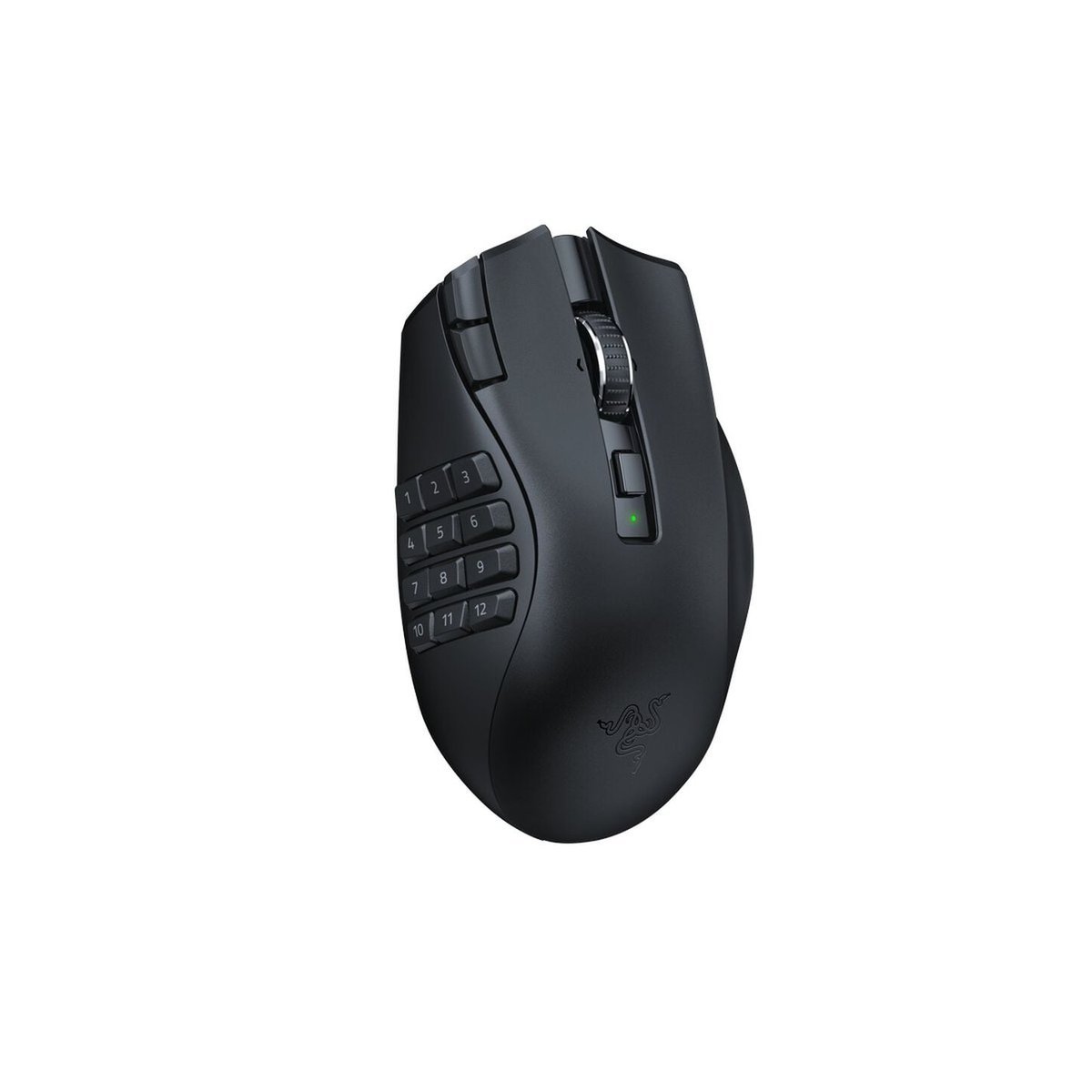


Razer Naga V2 HyperSpeed
A fixed 12-button panel and the same Focus Pro 30K sensor as the flagship, tuned for battery life - up to 400 hours on Bluetooth per third-party roundup data. It erases charging anxiety, the main objection to wireless MMO mice.
- Up to 400 hours on Bluetooth (third-party figure)
- Focus Pro 30K optical sensor
- 2.4GHz + Bluetooth dual wireless
Important limitation: No swappable plates and no slider - the 12-button panel is fixed; the 400-hour figure is Bluetooth-only and 2.4GHz runtime is shorter (exact figure not published in sources).
- Sensor: Focus Pro 30K optical
- Programmable controls: 19
- Battery: Up to 400 hrs (Bluetooth)
Best for: Wireless MMO players who value battery life above all.
4. Logitech G600: Best Budget Classic
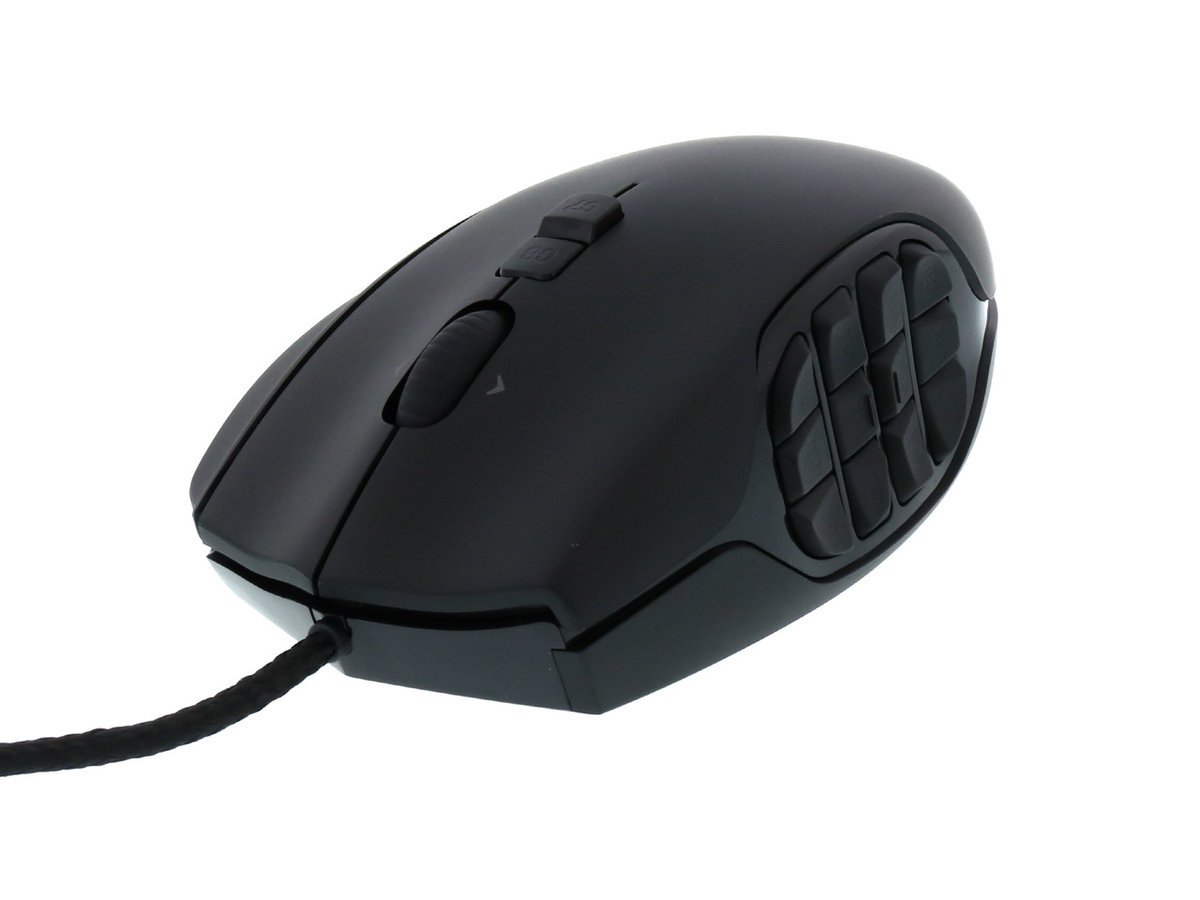
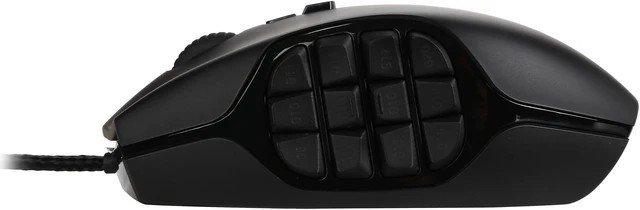
The G600 is the old soldier of MMO mice: in production for over a decade, with 20 buttons, a 12-button angled thumb panel, and the unique G-Shift feature: a third main click button that acts as a modifier, doubling every other button's binding while held.
What stands out. G-Shift is genuinely unique: hold the third click button and your 12 thumb buttons become 12 different bindings: 20 buttons effectively become far more, which is why the G600 has survived against newer competitors. The angled thumb panel groups the 12 buttons in two banks of six with distinct tactile shaping, so blind navigation is easier than on flat grids. The braided cable and 20-million-click-rated switches are built for the long haul, and the price, typically the lowest of the name-brand options, makes it the value king.
Limitations. The sensor is the weak point on paper: 8200 DPI laser tracking (per Logitech's own listing and GamersNexus's review) versus the 18K–30K optical sensors elsewhere in this guide. In practice, at MMO sensitivities (800–3200 DPI), the difference is far smaller than the numbers suggest, but it is real, and FPS players will notice. It is wired only, it is 133g (148g with cable), and the design is a decade old, with ergonomics that some hands love and others do not. Note: one third-party comparison table claims a "HERO 25K" refresh of the G600; we could not verify this on Logitech's own materials, so it is not stated here; buy based on the verified 8200 DPI spec.
Who should buy it: budget-conscious MMO veterans who want maximum keybinds per dollar. Who should skip it: players who need a modern optical sensor, or anyone who wants wireless.
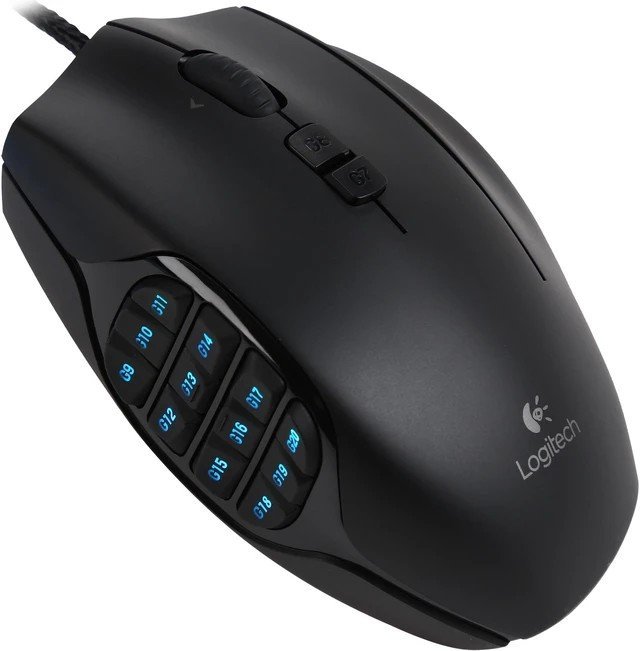
Logitech G600
The decade-old MMO classic: 20 buttons, a 12-button angled thumb panel, and G-Shift - a third click button that doubles every other binding while held. Nothing else offers this many keybinds per dollar.
- G-Shift modifier effectively doubles your keybinds
- Angled 12-button thumb panel in two tactile banks of six
- Braided cable and 20-million-click-rated switches
Important limitation: The 8200 DPI laser sensor is a generation behind the 18K-30K optical sensors elsewhere here, and it is wired only.
- Sensor: 8200 DPI laser
- Buttons: 20 total
- Weight: 133g (148g with cable)
Best for: Budget-conscious MMO veterans who want maximum keybinds per dollar.
5. Redragon M908 Impact: Best Ultra-Budget
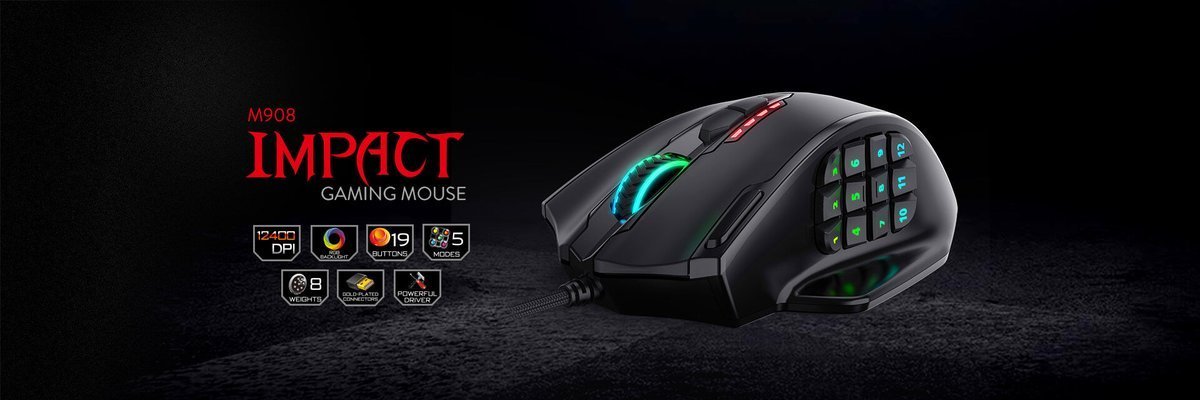
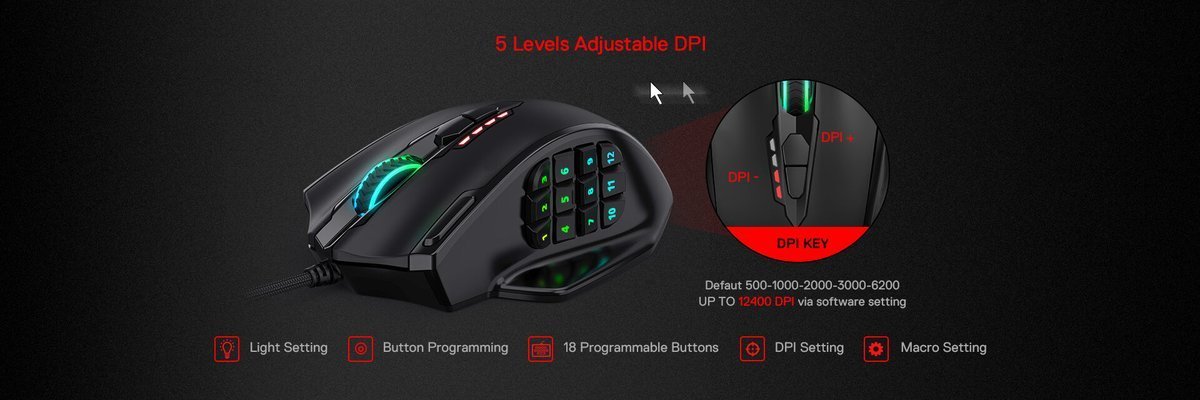
The M908 Impact is the budget brand's answer to the MMO mouse: a 12-button thumb grid, 12,400 DPI optical sensor, and 19 macro buttons at a price that undercuts every name-brand option by a wide margin.
What stands out. Price-to-buttons ratio: nothing else puts 12 thumb buttons under your thumb for this little money. The 12,400 DPI optical sensor is honest mid-range hardware, more than enough for MMO sensitivities, and the macro software covers the remapping basics. For a first MMO mouse, or a second PC, it is a legitimate way to try the 12-button lifestyle without committing flagship money.
Limitations. Build quality and ergonomics are where the money was saved: listings describe a heavier mouse, the thumb grid is fixed with no slider or plate options, and the software is functional rather than polished. Long-term durability data is thinner than for the decade-old G600 or the established Scimitar. Buy it as an entry point, not as a ten-year mouse.
Who should buy it: first-time MMO mouse buyers and tight budgets. Who should skip it: anyone who can stretch to the G600: the Logitech's G-Shift and proven durability are worth the step up.

Redragon M908 Impact
The cheapest credible route into the 12-button lifestyle: a full thumb grid and a 12,400 DPI optical sensor for a fraction of the flagship price. A legitimate first MMO mouse, or a second-PC pick.
- 12-button thumb grid at an ultra-budget price
- 12,400 DPI optical sensor - ample for MMO sensitivities
- 19 macro buttons (per listings)
Important limitation: Build quality and ergonomics are where the money was saved - listings describe a heavier mouse, the grid is fixed, and long-term durability data is thin.
- Sensor: 12,400 DPI optical
- Thumb buttons: 12
- Connection: Wired USB
Best for: First-time MMO mouse buyers and the tightest budgets.
6. UtechSmart Venus Pro: Best Low-Cost Wireless (Honorable Mention)
The Venus Pro is the budget wireless alternative: a 12-button thumb grid, 16,000 DPI sensor, and both 2.4GHz wireless and wired operation. If the Naga V2 HyperSpeed's price stings but you still want to cut the cable, this is the compromise: wireless MMO keybinds at a budget price. Trade-offs versus the Razer: a less refined sensor and software ecosystem, and thinner long-term reliability data. Worth a look for wireless-curious budget buyers.

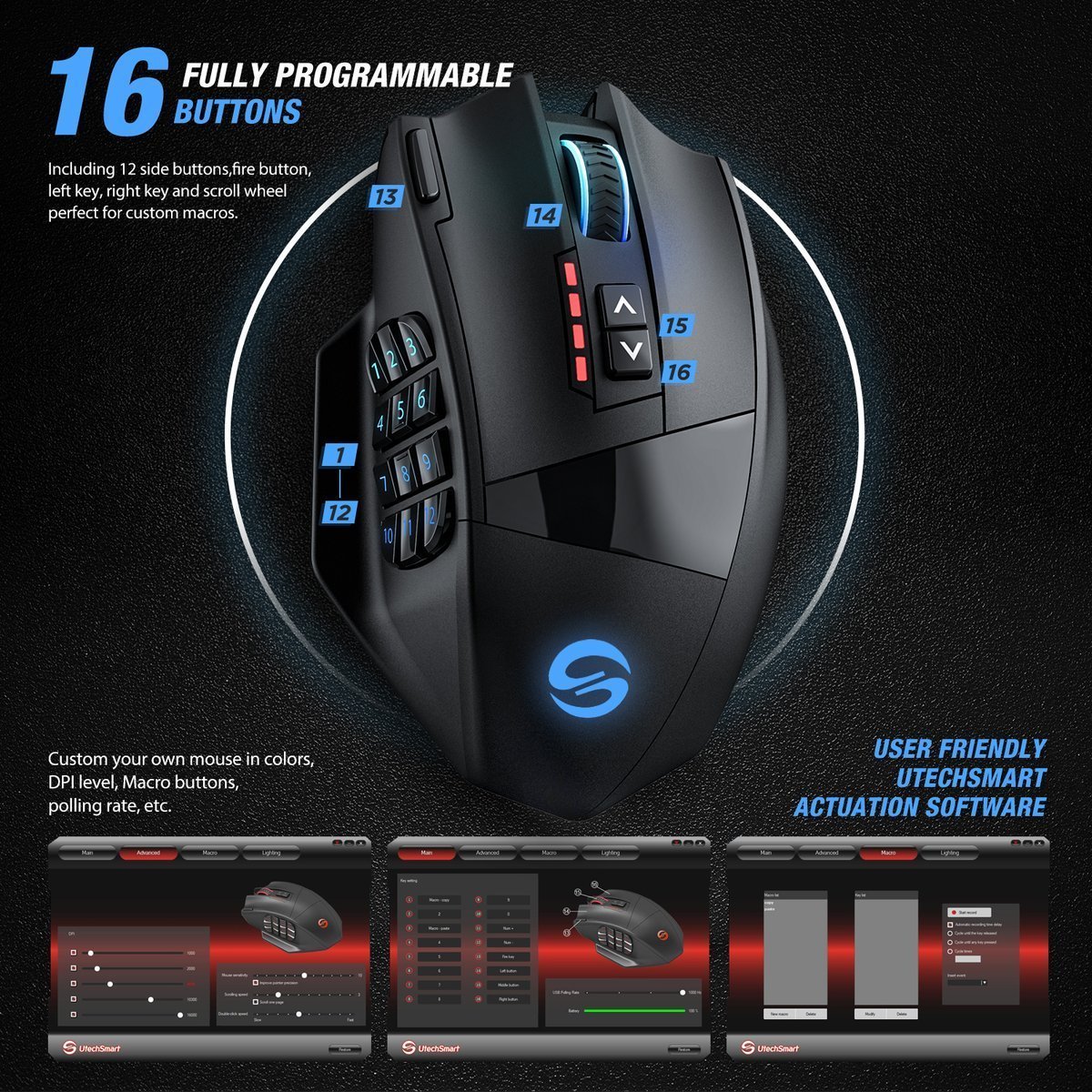
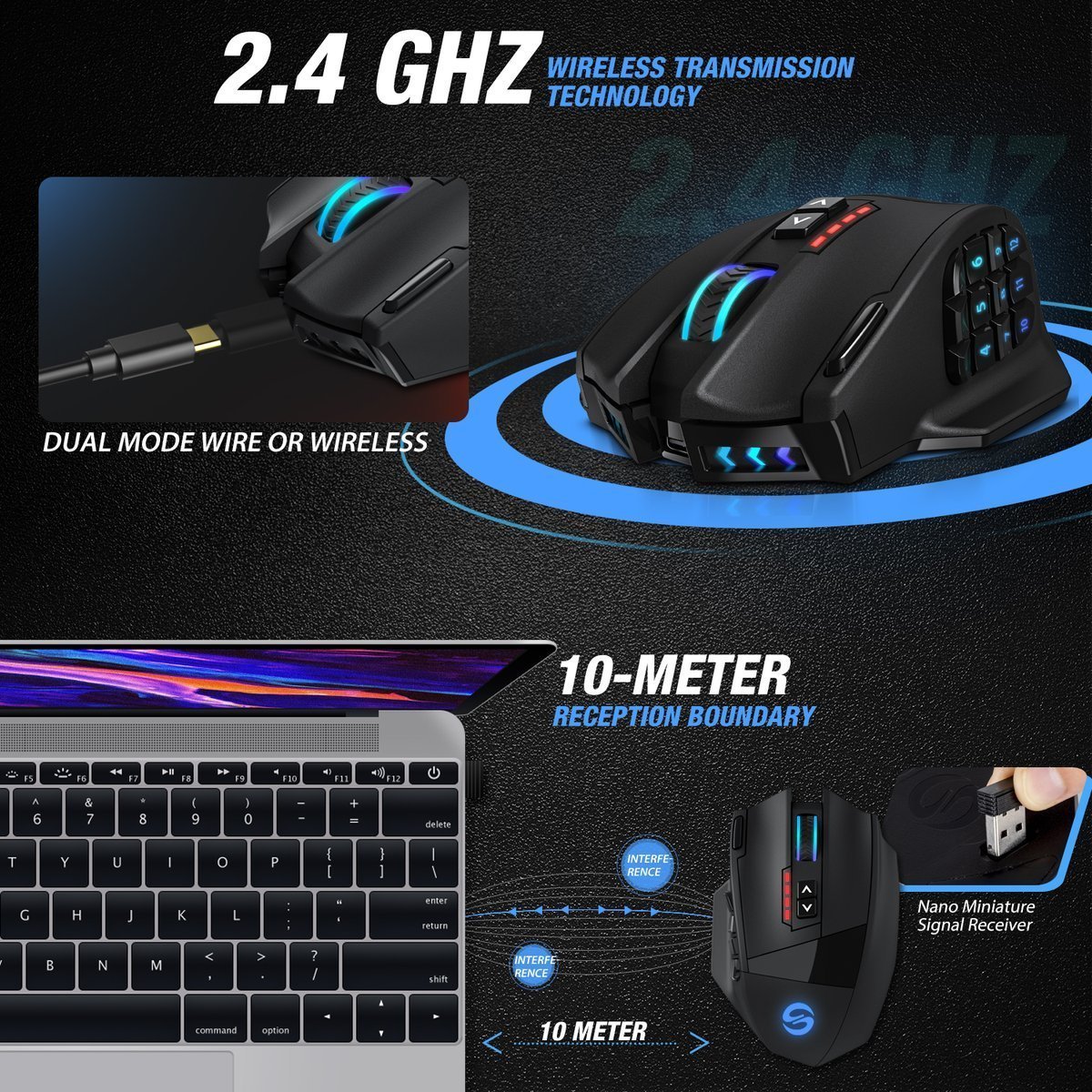
UtechSmart Venus Pro
The budget wireless alternative: a 12-button thumb grid, a 16,000 DPI sensor, and both 2.4GHz wireless and wired operation. It cuts the cable without the Naga V2 HyperSpeed's price.
- 2.4GHz wireless + wired dual operation
- 12-button thumb grid
- 16,000 DPI sensor
Important limitation: A less refined sensor and software ecosystem than Razer's, and thinner long-term reliability data.
- Sensor: 16,000 DPI
- Thumb buttons: 12
- Connection: 2.4GHz wireless + wired
Best for: Wireless-curious budget buyers.
Buying Guide: How to Choose an MMORPG Mouse
The thumb keypad is the whole product
Everything else is secondary. Evaluate the keypad on three things: reach (can your thumb hit all 12 buttons without shifting your grip? This is what the Scimitar's slider solves), tactile separation (can you feel the gaps between buttons? The G600's angled banks excel here), and default mapping (does it emulate the number row out of the box? The Scimitar does). If possible, try the grid in a store; if not, buy from a retailer with a good return policy. Thumb fit is personal and cannot be spec-sheeted.
Sensor: what actually matters for MMOs
MMO players typically run 800–3200 DPI, a range every mouse in this guide covers comfortably. Above that, sensor differences are academic for MMOs (they matter for high-sensitivity FPS play). What does matter: optical vs laser (optical sensors like the PMW3391 and Focus Pro 30K track more consistently across surfaces than the G600's older laser sensor), and polling rate (1000Hz is standard; all of these qualify). Do not pay extra for 30K DPI you will never use; do pay attention to sensor generation.
Wired vs wireless: the real trade-offs
Wired (Scimitar, G600, M908): zero charging, zero latency concerns, lower price. Wireless (Naga V2 Pro, V2 HyperSpeed, Venus Pro): no cable drag, cleaner desk, but charging is a fact of life, mitigated by the HyperSpeed's 400-hour Bluetooth figure. For MMOs specifically, wireless latency is a solved problem on modern 2.4GHz implementations; the choice is about charging tolerance and desk setup, not performance.
Button count vs usability
More buttons are not automatically better. Twelve thumb buttons cover a full WoW/FFXIV hotbar; the G600's G-Shift doubles that for players who genuinely use 20+ keybinds. But every button you cannot reliably hit blind is a liability, not an asset: a clean 12-button grid you can navigate by feel beats a 20-button layout you fumble. Start with 12; add G-Shift-style modifiers only if you run out.
Software and onboard memory
You will remap buttons. Count on it. Razer's Synapse, Corsair's iCUE, and Logitech's G Hub all handle per-game profiles and macros; quality varies, but all three are mature. Onboard memory (the Scimitar stores profiles on the mouse) matters if you play on multiple PCs or at LANs; your keybinds travel with the hardware.
Grip and hand size
MMO mice are palm-grip mice by design: the thumb keypad only works if your thumb rests naturally on the side. Large-handed players who find standard MMO mice cramped should look for the widest, longest shells and buy from a retailer with easy returns. Small-handed players should prioritize the Scimitar's slider (bring the grid to your thumb) over fixed grids. Weight matters less for MMOs than for FPS, since you are not flick-shotting, but the spread in this guide, from 122g (Scimitar) to around 134g (Naga V2 Pro), is noticeable over a four-hour raid.
How this guide was researched
We did not hands-on test these mice, so please read this guide for what it is: a research-based comparison, not a hands-on review. The specifications and product details come from the manufacturers' own listings and from independent roundups and reviews of these models. Where sources disagreed, or a claim could not be confirmed against the manufacturer's materials (for example, the rumored G600 sensor refresh mentioned in the G600 review above), we left the claim out rather than repeat it. The recommendations rest on how each mouse's features line up with what MMO players actually need: thumb-grid fit, enough buttons to cover a full hotbar, sensor generation, and the wired versus wireless trade-offs covered in this guide.
The 5 Types of MMORPG Mouse
1. Adjustable-grid wired (Scimitar RGB Elite). The ergonomic pick: slide the thumb grid to fit. Best for: most MMO players.
2. Swappable-plate wireless (Naga V2 Pro). One mouse, three layouts, no cable. Best for: multi-genre players.
3. Battery-life wireless (Naga V2 HyperSpeed). 400-hour Bluetooth, fixed 12-button panel. Best for: wireless without charging anxiety.
4. Budget classic wired (G600). 20 buttons + G-Shift, proven for a decade. Best for: maximum keybinds per dollar.
5. Ultra-budget wired (M908 Impact). The cheapest 12-button entry. Best for: first MMO mouse, second PC.
MMORPG Mouse vs. the Wider Gaming Mouse Market
The MMO mouse is a specialist tool. Here is how it positions against the alternatives, framed as trade-offs, because we verified MMO-mouse specs directly and are not asserting competitors' current specs or prices, which change.
Standard gaming mice (e.g. Logitech G502, Razer Basilisk). Excellent all-rounders with a handful of side buttons (typically 2–6). For MMOs, they run out of thumb real estate fast; you will be reaching for the keyboard for half your rotation. Choose a standard gaming mouse if you play MMOs casually alongside FPS titles; choose a true MMO mouse if MMOs are your main game. (See the general gaming mouse guide.)
FPS ultralights (e.g. Superlight-class). Built for speed: 50–65g, minimal buttons, flawless sensors. They are the wrong tool for MMOs: two side buttons cannot carry a 12-ability rotation. Do not buy an FPS mouse for an MMO main.
MOBA-oriented mice. Overlap heavily with MMO mice (the Naga's 6-button plate exists for this), but MOBAs need fewer keybinds, so a 6-button side panel is often the sweeter spot. If you split time between League/Dota and MMOs, the Naga V2 Pro's swappable plates are the answer.
The honest summary: if MMORPGs are your main game, a dedicated 12-button MMO mouse is one of the highest-impact upgrades you can buy, more impactful than a marginally better sensor. If MMOs are a side game, a standard gaming mouse with side buttons is the saner purchase.
Macros, automation, and game rules
Search results around MMO mouse "macros" sometimes blur the line between remapping and automation, so here is the bright line: remapping one button to one keypress is fine and is what these mice are for. Automating gameplay, one press performing a sequence of actions with timing, botting, or unattended play, violates the Terms of Service of World of Warcraft, Final Fantasy XIV, and virtually every major MMO, and will get your account suspended or banned. Hardware cannot protect you from detection. Use your MMO mouse for keybinds, not for automation: no macro is worth a decade-old account.
6 Common Mistakes When Buying an MMORPG Mouse
1. Buying on DPI numbers. At MMO sensitivities (800–3200 DPI), a 12,400 DPI sensor and a 30K sensor feel the same. Buy the thumb grid, not the DPI badge.
2. Ignoring thumb fit. A fixed 12-button grid that does not match your thumb is 12 buttons you will mispress. The Scimitar's slider exists for a reason, and if you buy fixed, buy from somewhere with returns.
3. Assuming wireless is worse. Modern 2.4GHz wireless is effectively lag-free for MMOs. The real wireless question is charging tolerance, not latency.
4. Overbuying buttons you cannot hit blind. Twelve well-separated buttons beat twenty fumbled ones. Add modifiers (G-Shift) only when you genuinely run out of keybinds.
5. Using macros for automation. One button = one action is fine. Automated sequences violate MMO Terms of Service and risk your account; see the section on macros and game rules above.
6. Skipping the software check. If you play on Linux or need deep remapping without vendor software, verify compatibility before buying: not all configuration software supports all platforms equally.
MMORPG Mouse FAQs
What is an MMORPG mouse? A gaming mouse with a 12-button thumb keypad on its left side, designed for MMORPGs like World of Warcraft and Final Fantasy XIV. The keypad mirrors the keyboard's number row, putting a full ability hotbar under your thumb so your left hand never leaves WASD. All the mice in this guide follow this formula with variations (adjustable grids, swappable plates, G-Shift modifiers).
Do I need an MMO mouse for WoW or FFXIV? Need? No: you can play both games on any mouse. But a 12-button MMO mouse is one of the highest-impact upgrades for serious players: your full rotation sits under your thumb, which is faster and more reliable than stretching for number keys mid-fight. If you raid, run dungeons, or PvP regularly, it is worth it; if you quest casually, a standard gaming mouse is fine.
Are wireless MMO mice good enough for raiding? Yes. Modern 2.4GHz wireless (Razer's HyperSpeed and equivalents) has effectively no perceptible latency for MMO gameplay; raiding is not a latency-critical use case the way competitive FPS is. The real considerations are battery life (the Naga V2 HyperSpeed's 400-hour Bluetooth figure leads here) and charging habits.
How many buttons do I really need? Twelve thumb buttons cover a full hotbar in WoW/FFXIV for most players. The Logitech G600's G-Shift effectively doubles that for players who run 20+ keybinds. More than that is rarely usable: buttons you cannot hit blind are liabilities. Start with 12.
What is G-Shift on the Logitech G600? A third main click button (next to left/right click) that acts as a modifier: hold it and every other button on the mouse switches to a second binding. It is unique to the G600 among current MMO mice and is the reason the 20-button G600 effectively offers far more keybinds than its button count suggests.
Are there left-handed MMORPG mice? Effectively no: every mouse in this guide (and virtually every 12-button MMO mouse on the market) is right-handed only, because the thumb keypad is molded for the left side of a right-hand grip. Left-handed MMO players generally use standard gaming mice with remappable side buttons or left-handed FPS mice. This is a genuine gap in the market, not an oversight in this guide.
Is the Logitech G600 still worth buying in 2026? For budget buyers, yes, with eyes open. The 20-button layout and G-Shift remain unmatched for keybinds per dollar, and the design is proven over a decade. The honest trade-off is the older 8200 DPI laser sensor versus modern 18K–30K optical sensors; at MMO sensitivities the gap is small but real. If your budget stretches to the Scimitar RGB Elite, the modern sensor and adjustable grid are worth it.
Final Verdict
The best MMORPG mouse for most players is the Corsair Scimitar RGB Elite: the adjustable KeySlider thumb grid solves the #1 ergonomic problem of MMO mice, the number-row default mapping makes it plug-and-play in WoW and FFXIV, and the PMW3391 sensor and 122g body are proven quantities. It is the pick that fits the most hands and the most games.
The Razer Naga V2 Pro is the pick for wireless players and multi-genre gamers: the swappable 12/6/2-button plates make it three mice in one. The Naga V2 HyperSpeed is the pick if battery life is your obsession. The Logitech G600 remains the budget king for maximum keybinds per dollar, G-Shift and all. And the Redragon M908 Impact is the honest entry point for trying the 12-button lifestyle cheaply.
Whichever you choose, remember what actually matters: thumb fit first, sensor generation second, DPI badge last. Get the grid that fits your hand, map your rotation to it, and your future self, mid-raid at 2 AM and hitting every interrupt on time, will thank you.
Reminder: we did not hands-on test these mice. Specs are from manufacturer listings and third-party roundups. Verify the exact variant's specs on the listing before you buy.
Final Recommendations
Best Overall: Corsair Scimitar RGB Elite: the adjustable KeySlider thumb grid solves the #1 ergonomic problem of MMO mice
Best Wireless: Razer Naga V2 Pro: swappable 12/6/2-button plates make it three mice in one, with lag-free wireless
Best Battery Life: Razer Naga V2 HyperSpeed: up to 400 hours on Bluetooth with a fixed 12-button panel and the flagship sensor
Best Budget Classic: Logitech G600: 20 buttons plus G-Shift, the budget king for keybinds per dollar
Best Ultra-Budget: Redragon M908 Impact: the honest entry point for trying the 12-button lifestyle cheaply
Best Low-Cost Wireless: UtechSmart Venus Pro: budget wireless with a 12-button grid and a 16,000 DPI sensor
Related Guides
- Gaming mice: the complete buying guide
- Gaming mice with side buttons
- Budget gaming mice
- Razer DeathAdder software and setup guide