
The short answer: which ergonomic keyboard should you buy?
Most people should buy the Logitech Wave Keys (Graphite). It is a compact, wave-shaped wireless ergonomic keyboard with a 3-layer memory-foam palm rest, Bluetooth plus Logi Bolt connectivity for up to three devices, and up to 36 months of battery life from two AAA batteries. It is part of Logitech's Ergo Series and carries an ergonomic certification from United States Ergonomics.
If you want the classic comfort formula, the Incase Sculpt Ergonomic Keyboard (5KV-00001) is the pick: a domed, one-piece split keyset with a cushioned palm rest, a natural-arc layout, a removable reverse-tilt elevator, and a separate wireless number pad. If you want the deepest ergonomic commitment, the Kinesis Advantage360 Professional (KB360-PRO-GBR) splits into two independent halves with contoured key wells, thumb clusters, adjustable tenting, and open ZMK firmware.
What this guide is: a research synthesis of three ergonomic keyboards, built from manufacturer specifications and published reviews. We did not conduct hands-on lab testing; nothing here claims we tested anything in a lab. What this guide does not do is offer medical advice. No keyboard cures or treats wrist pain, and we frame every ergonomic feature as a design characteristic, not a health outcome.
Why only three picks? Because three is the honest count. Every pick here carries a verified link to its exact variant. Cheaper split keyboards exist, but none met the verification standard required for a linked recommendation, so this guide names no budget pick rather than linking one we could not verify. If your budget is tight, the Wave Keys is the lowest-priced pick in this guide, and it is the one most buyers should start with.
Quick Picks
Short on time? These are our top recommendations. Each button takes you to the exact product on Amazon.
| Keyboard | Type | Connection | Best for | |
|---|---|---|---|---|
| Logitech Wave Keys (Graphite) | Wireless wave compact | Bluetooth + Logi Bolt | Most people | Check Price on Amazon |
| Incase Sculpt Ergonomic Keyboard | One-piece split, keyboard + number pad | USB-A dongle | Classic comfort | Check Price on Amazon |
| Kinesis Advantage360 Professional | Fully split mechanical | Bluetooth LE + wired | Premium and programmable | Check Price on Amazon |
Best ergonomic keyboards: detailed reviews
1. Logitech Wave Keys (Graphite): Best overall ergonomic keyboard
The Logitech Wave Keys is the ergonomic keyboard most people should buy. Instead of a traditional flat layout, its wavy keyframe places your hands, wrists, and forearms in a more natural typing position, while the cushioned palm rest, built with three layers of memory foam, supports your wrists as you type. It is part of Logitech's Ergo Series and carries an ergonomic certification from United States Ergonomics.
Despite being a compact keyboard, it keeps a full number pad, so you do not give up spreadsheet functionality to save desk space. Connectivity is genuinely flexible: Bluetooth or the included Logi Bolt USB receiver, with Easy-Switch keys to hop between up to three devices (laptop, tablet, phone). It works across Windows, macOS, ChromeOS, iPadOS, Linux, and Android. Two AAA batteries (included) deliver up to 36 months of life, and tilt legs add slope for a more comfortable angle. Logi Options+ on Windows and macOS lets you remap keys per app.
Who should buy it: office workers, writers, and anyone who types for hours and wants proven comfort with zero learning curve. The wave shape feels familiar within minutes.
Who should skip it: mechanical-switch fans (the Wave Keys uses membrane-style keys), and typists who want a true split where the halves separate. For full separation, see the Kinesis Advantage360 Professional below.
Key specifications (per Logitech product documentation): wave-shaped compact layout with number pad; cushioned 3-layer memory-foam palm rest; Bluetooth Low Energy + Logi Bolt receiver; Easy-Switch for 3 devices; 2x AAA batteries, up to 36-month life; tilt legs; multi-OS layout; certified ergonomic by United States Ergonomics. Model 920-011898, Graphite, 101 keys.


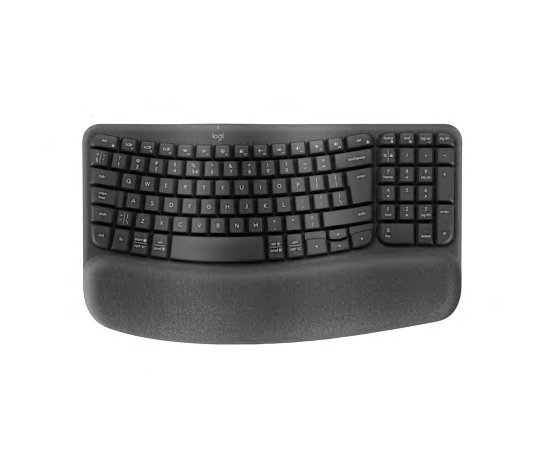
Logitech Wave Keys (Graphite)
The ergonomic keyboard most people should buy: a wavy keyframe places hands, wrists, and forearms in a natural typing position, with a cushioned palm rest (three layers of memory foam). Part of Logitech's Ergo Series; certified ergonomic by United States Ergonomics. Compact but keeps a full number pad; Bluetooth or Logi Bolt USB receiver, Easy-Switch for 3 devices; 36-month battery life; tilt legs; Logi Options+ remapping.
- Wavy keyframe + cushioned memory-foam palm rest
- US Ergonomics certified; Logitech Ergo Series
- Bluetooth / Logi Bolt, Easy-Switch for 3 devices
- Up to 36 months from two AAA batteries
- Membrane-style keys, not mechanical switches
- No true split separation between halves
- No backlighting, which helps the long battery life but hurts dark-room typing
- Type: Wireless ergonomic
- Battery: Up to 36 months
- Extras: Number pad, Easy-Switch
Best for: Most people wanting an ergonomic keyboard without a learning curve
2. Incase Sculpt Ergonomic Keyboard: Best classic comfort pick
The Sculpt Ergonomic Keyboard is the classic that proved the category could be beautiful, and it lives on under Incase as Designed by Microsoft. The formula is unchanged: a domed, one-piece split keyset that positions wrists at a natural angle, a cushioned palm rest, a natural-arc key layout that follows the curve of your fingertips, and reverse tilt via a removable front elevator that promotes a straight, neutral wrist position.
The set includes a separate wireless number pad you can place on either side of the keyboard, or remove entirely to pull your mouse closer. Note carefully what this set is: keyboard plus number pad. No mouse is included in this set. Connectivity is a factory-paired USB-A wireless dongle (no Bluetooth, no wired option), and the keyboard runs on two AAA batteries with the number pad on its own CR2430 cell, over an AES 128-bit encrypted link. The scissor key style feels instantly familiar to laptop typists.
Who should buy it: longtime fans of the classic ergonomic line, and Windows users who want a proven, comfortable, one-piece split keyboard with a detachable number pad.
Who should skip it: multi-OS households (it is Windows-first, with limited macOS function support), Bluetooth-only setups, and tinkerers who want programmability.
Key specifications (per Incase documentation): domed split keyset; cushioned palm rest; removable reverse-tilt elevator; separate wireless number pad; wireless USB-A dongle (factory paired); 2x AAA batteries (keyboard) + CR2430 (number pad); AES 128-bit encryption; Windows 11/10 primary (macOS supported with limited functions). Model 5KV-00001, 15.5 x 9 x 2.7 inches, 2 pounds.
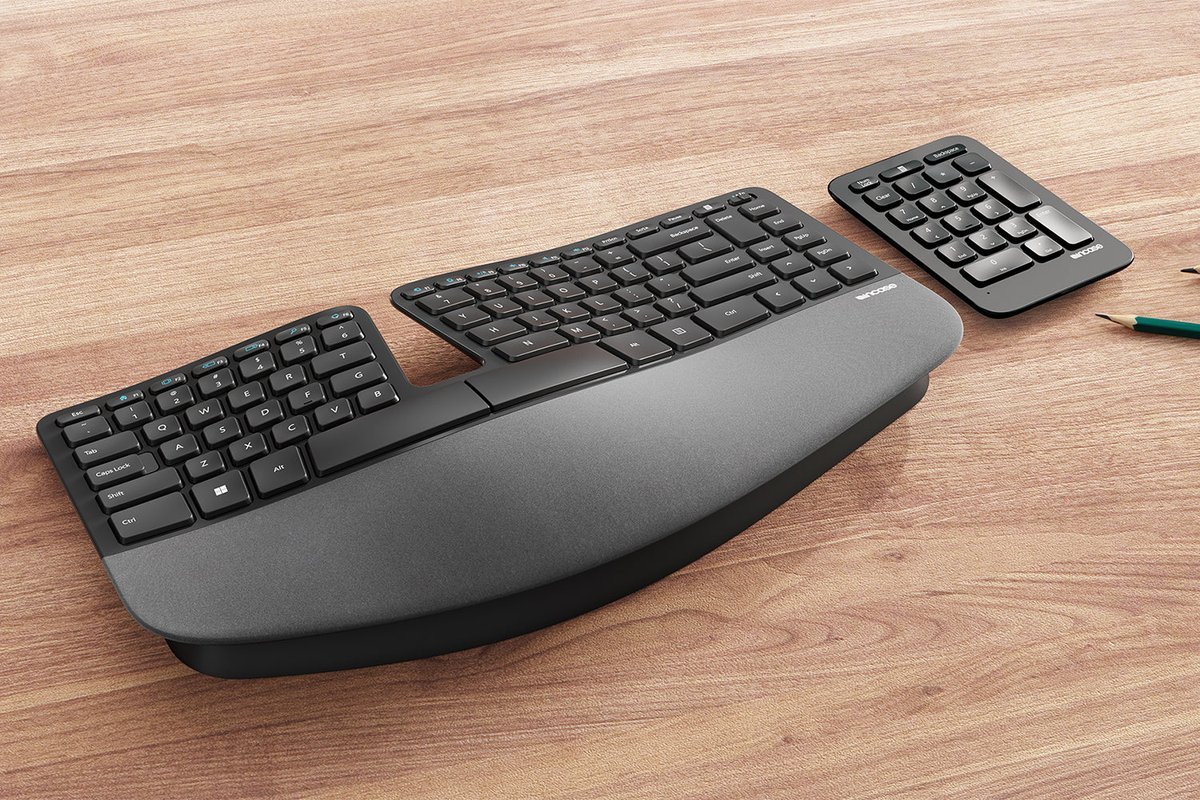
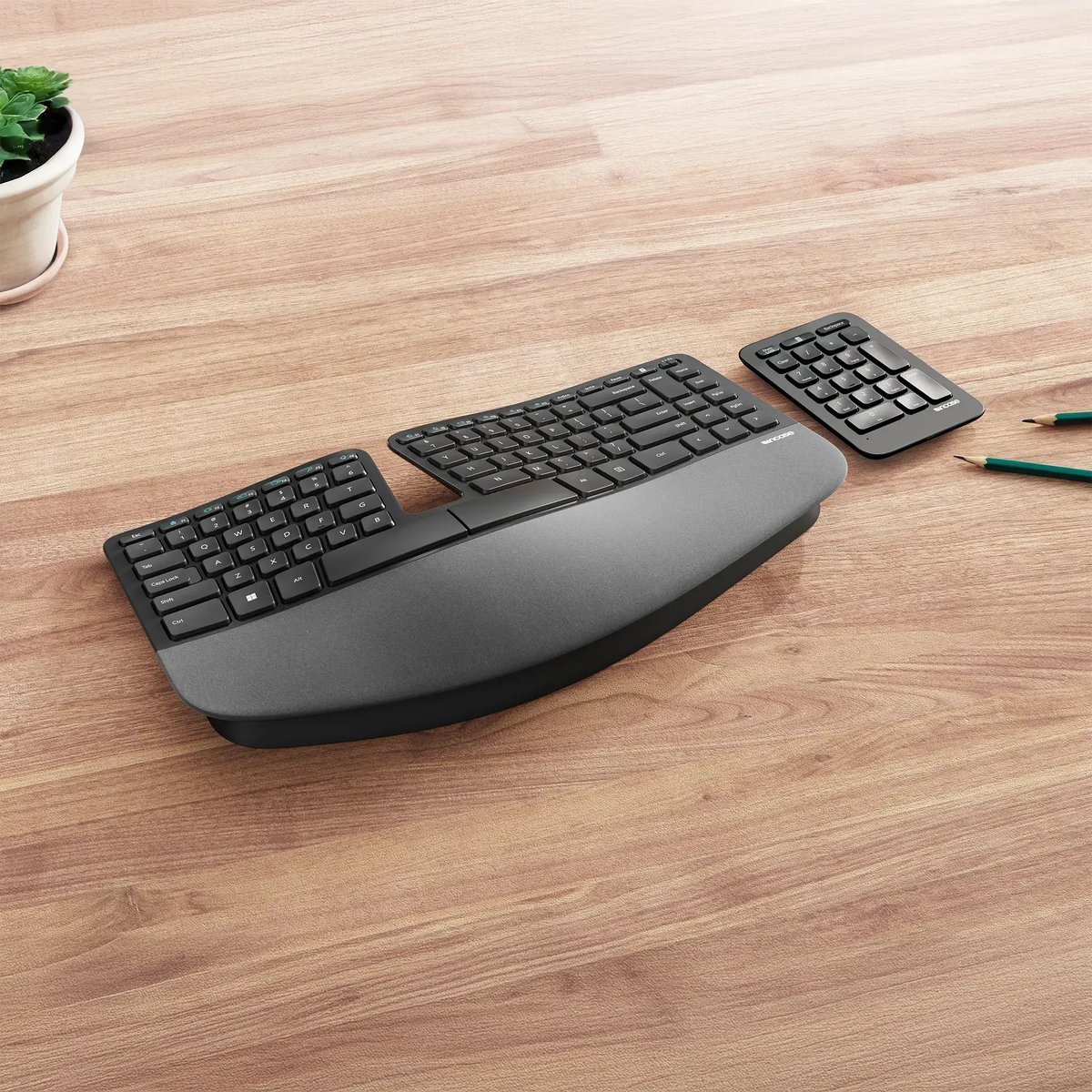

Incase Sculpt Ergonomic Keyboard
The classic that proved the category could be beautiful, living on under Incase (Designed by Microsoft): a domed, one-piece split keyset positioning wrists at a natural angle, cushioned palm rest, natural-arc key layout, reverse tilt via removable front elevator. The set adds a separate wireless number pad (either side or removed); factory-paired USB-A dongle; 2x AAA + CR2430; AES 128-bit; Windows 11/10 primary. No mouse is included in this set.
- Domed split keyset; natural-arc layout
- Cushioned palm rest; reverse tilt
- Separate number pad, placeable either side or removed
- Scissor keys familiar to laptop typists
- Factory-paired USB-A dongle only (no Bluetooth, no wired option)
- Windows-first; limited macOS function support
- One-piece split: no true separation or tenting
- Type: Wireless split keyboard + number pad
- Keys: Scissor
- Connection: USB-A dongle
Best for: Laptop typists wanting a classic, beautiful ergonomic setup
3. Kinesis Advantage360 Professional: Best premium ergonomic keyboard
The Kinesis Advantage line has been the benchmark for high-end ergonomic keyboards for decades, and the Advantage360 Professional splits the iconic design into two independent halves. The contoured key wells cup each hand in a relaxed position, and thumb clusters put the keys your thumbs reach, Enter, Backspace, Space, modifiers, under your strongest fingers, reducing pinky strain from awkward combos. The halves connect wirelessly via Bluetooth Low Energy and also support wired operation; ZMK open firmware powers extensive remapping, macros, and layers.
Tenting is adjustable across three heights, the mechanical switches are hot-swappable (Gateron Brown tactile or Kailh Box Pink linear quiet at checkout), and the whole design is aimed at typists who type all day and want the deepest ergonomic commitment a mainstream board offers. It is the priciest board on this list and the most complex to learn. The contoured wells plus thumb clusters demand a real adjustment period.
Who should buy it: professional typists, developers, and anyone willing to invest two to three weeks of adaptation for the most adjustable, most programmable board here.
Who should skip it: anyone who wants to be productive on day one; the learning curve is the real cost. Spreadsheet users should also note there is no number pad: the tenkeyless design trades the 10-key for closer mouse placement.
Key specifications (per Kinesis): fully split halves; concave contoured key wells; thumb clusters; hot-swappable mechanical switches (Gateron Brown or Kailh Box Pink); Bluetooth LE wireless + wired; adjustable tenting (3 heights); ZMK open firmware; 1500 mAh rechargeable battery; 3-year limited warranty. Model KB360-PRO-GBR.
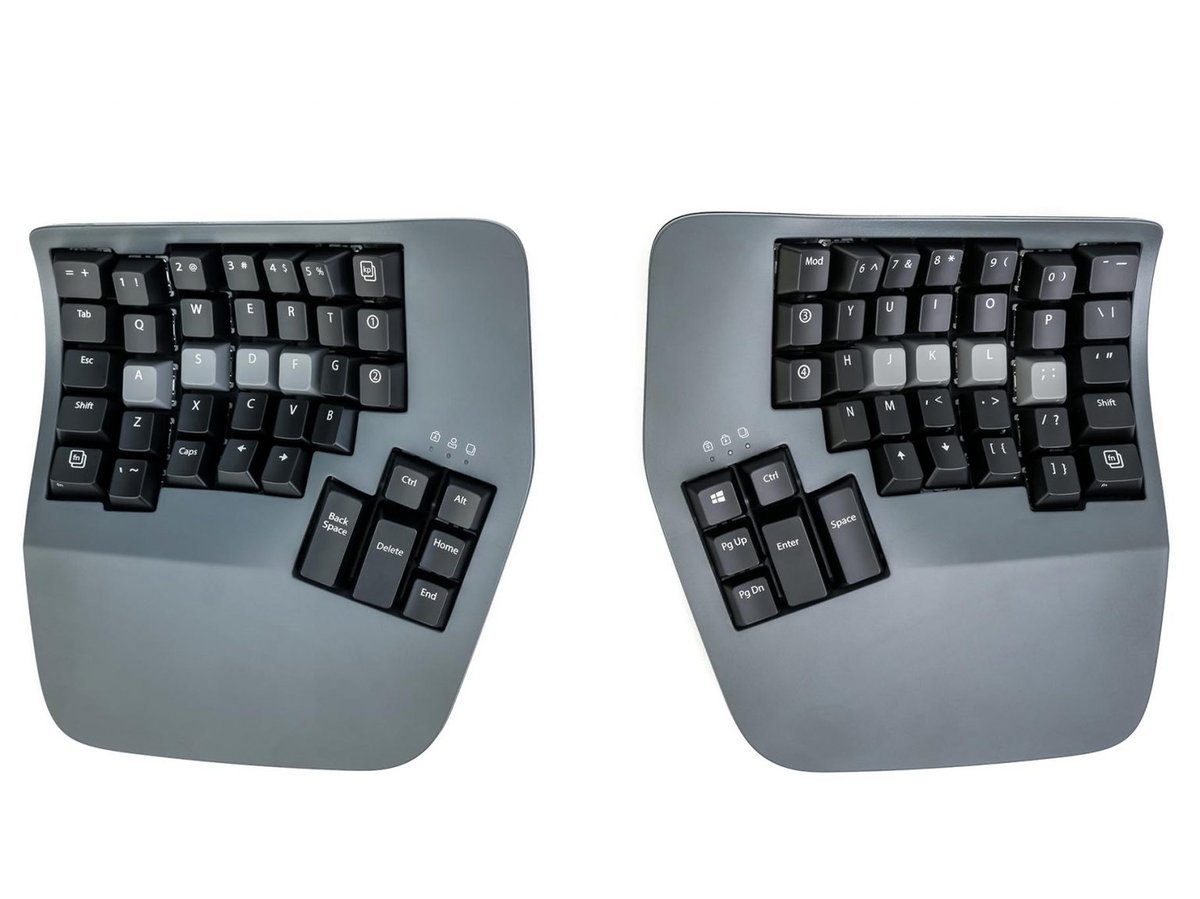
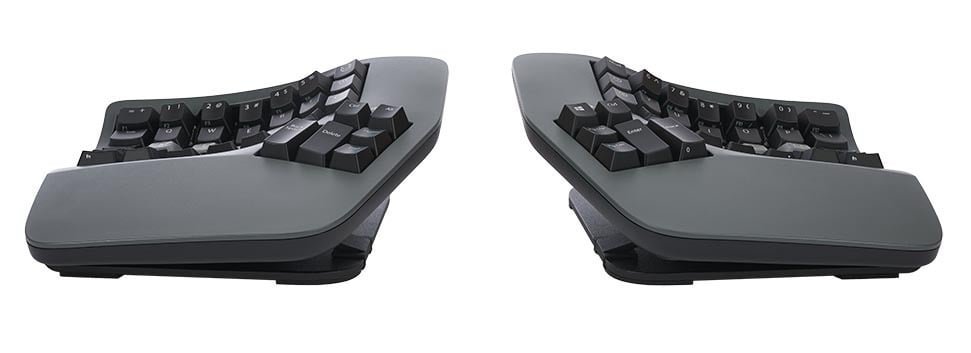
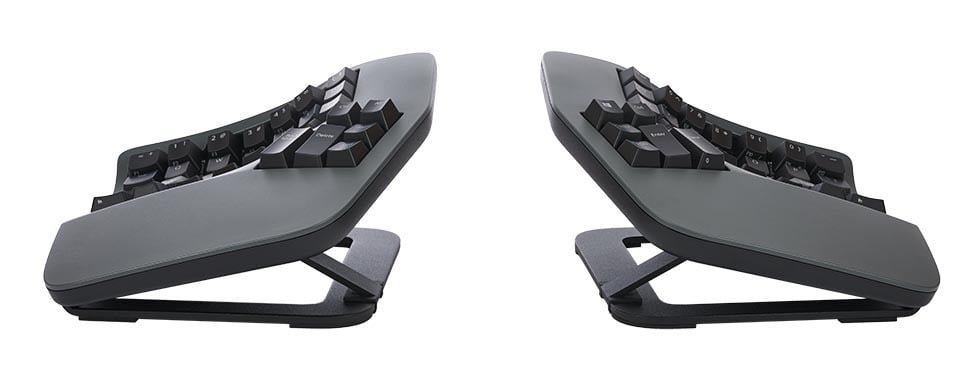
Kinesis Advantage360 Professional
The benchmark for high-end ergonomic keyboards, split into two independent halves: contoured key wells cup each hand in a relaxed position, thumb clusters put Enter, Backspace, Space, and modifiers under your strongest fingers. Halves connect wirelessly via Bluetooth Low Energy and also support wired operation; ZMK open firmware powers extensive remapping, macros, and layers. Hot-swappable mechanical switches; adjustable tenting.
- Contoured key wells + thumb clusters
- Bluetooth LE wireless + wired; ZMK open firmware
- Hot-swappable mechanical switches; adjustable tenting
- Shine-through keycaps with optional white backlighting
- Premium pricing, the highest in this guide
- Steep learning curve: wells plus thumb clusters take weeks to adapt to
- No number pad; the tenkeyless design trades the 10-key for closer mouse placement
- Type: Split mechanical
- Firmware: ZMK open
- Connection: Bluetooth LE + wired
Best for: Buyers wanting the premium, fully-programmable ergonomic keyboard
Pairing a mouse with your ergonomic keyboard
Some buyers want to upgrade the whole desk at once rather than shop for a keyboard alone. If that is you, pair deliberately instead of buying a bundle by accident.
The most coherent ergonomic pairing on this list is the Logitech Wave Keys with a Logitech Lift vertical mouse. Logitech sells the two as a combo, and both devices use Logi Bolt, so one receiver can serve both and you keep a USB port free. The practical advice: pair a keyboard and mouse that share one wireless receiver so both devices stay on the same link. And note the contrast with the Sculpt pick above: the Sculpt set here is keyboard plus number pad only. If you want a mouse with it, you buy that separately; do not assume one is in the box.
How to choose an ergonomic keyboard: the buying guide
This guide recommends three keyboards and no budget pick. That is deliberate: no cheaper split keyboard met the verification standard for a linked recommendation. The advice below therefore covers the three verified picks, and says plainly where a cheaper option would have sat.
1. Decide how much adjustability you actually need
Ergonomic keyboards sit on a spectrum. Fixed-shape boards (Logitech Wave Keys, Incase Sculpt) bake a curve or split into one piece: zero learning curve, zero configuration, but you cannot change the geometry. Contoured boards (Advantage360 Professional) rebuild the typing surface entirely: maximum customization, maximum commitment. Match the board to your patience: most people are better served by a fixed-shape board they will actually use than a premium board they abandon after a week.
2. Split vs. tenting vs. contoured key wells
These solve different problems. A split layout straightens your wrists side-to-side (reduces ulnar deviation). The Sculpt does this in one piece; the Advantage360 Professional does it with two fully separate halves you can widen to shoulder width. Tenting, raising the inner edges of the halves, reduces the inward rotation of your forearms (pronation); the Advantage360 Professional offers three tent heights. Contoured key wells shorten finger travel by cupping the keys into concave bowls. You do not need all three; figure out which wrist behavior bothers you most when you type and buy the feature that addresses it. Note that some roundups on the web use these terms interchangeably. They are not interchangeable.
3. Membrane vs. mechanical vs. scissor switches
Most comfort-first ergonomic boards use membrane or scissor switches (Wave Keys, Sculpt): quiet, low-effort, familiar. The enthusiast tier uses mechanical switches (Advantage360 Professional), which are more tactile and, crucially, hot-swappable here, so you can change the feel without soldering. If you share an office or take calls all day, membrane or scissor is the considerate choice; if you are a hobbyist, mechanical is the playground.
4. Wireless or wired?
Wireless (Wave Keys, Sculpt, Advantage360 Professional's Bluetooth) keeps the desk clean; the Wave Keys' three-year battery life from AAA batteries is the gold standard of set and forget. The Advantage360 Professional also works wired, which never drops a keystroke and never needs charging. Most ergonomic buyers overvalue wireless here: the keyboard does not move around on your desk.
5. Size and desk footprint
Ergonomic boards range from compact (Wave Keys at about 376 mm wide) to genuinely wide (the Sculpt with its separate number pad placed alongside, and the Advantage360 Professional with its halves spread). Measure your desk and, more importantly, your mouse hand: a full-size board pushes the mouse further right, which can strain the shoulder the keyboard is trying to spare. The Sculpt's detachable number pad solves this by letting you move the pad out of the way or remove it.
6. Learning curve: be honest about the first two weeks
Fixed-shape boards (Wave Keys, Sculpt) have near-zero learning curves. Most people type at full speed within a day. Contoured wells and thumb clusters (Advantage360 Professional) take one to three weeks. Budget this honestly: a board with a steep learning curve that you do not finish is just an expensive paperweight.
Ergonomic keyboard types explained
One-piece fixed-split keyboards, the Incase Sculpt, have the split molded into a single chassis. They are the most approachable, and they fix the side-to-side wrist angle without asking you to configure anything.
Contoured key-well keyboards, the Kinesis Advantage360 Professional, keep the hands cupped in concave wells so fingers move less. This is the design with the deepest ergonomic pedigree and the longest adaptation period.
Wave/curved compact keyboards, the Logitech Wave Keys, take a conventional one-piece design and add a gentle wave plus wrist support. The smallest behavioral change of the set.
Ergonomic vs. standard keyboards: what is actually different?
Three things change: the key surface (split, curved, or contoured instead of flat and straight), the wrist support (integrated palm rests instead of desk edge), and sometimes the angle (tenting or reverse tilt instead of the front-raised slope of standard boards). Everything else, OS compatibility, connectivity standards, media keys, works the same way as a normal keyboard.
One more distinction worth making: "ergonomic" is a design description, not a medical certification you can assume. The Wave Keys carries third-party ergonomic certification from United States Ergonomics; that means the design was assessed against ergonomics criteria, not that it prevents or treats any condition. If you have persistent wrist or forearm pain, talk to a clinician. A keyboard is a tool, not treatment.
Common mistakes to avoid
Mistake 1: Buying adjustability you will not use. The Advantage360 Professional's contoured wells and thumb clusters are only valuable if you invest the time to adapt. If you will not, the Wave Keys gives you most of the day-to-day benefit with none of the setup.
Mistake 2: Ignoring the mouse side of the equation. Many roundups and forum threads recommend ergonomic keyboards while the mouse, used just as much, gets no attention. If you upgrade the keyboard, budget for a matching ergonomic mouse too. The Wave Keys pairs with Logitech's Lift mouse over one Logi Bolt receiver. The Sculpt set, by contrast, contains no mouse, so do not count on one being in the box.
Mistake 3: Confusing "split" with "separate." A one-piece split-key board (Sculpt) fixes side-to-side wrist angle but does not let you widen the halves to shoulder width. If your shoulders are broad or you want the mouse between the halves, only a true split (Advantage360 Professional) does that.
Mistake 4: Expecting a keyboard to resolve pain. This is the bad advice we see in some ranking pages: reviews that promise wrist-pain relief as a product outcome. Ergonomic keyboards are designed to support more neutral hand and wrist positions while typing. That is a real, useful design difference, and it is as far as the honest claim goes. Persistent symptoms deserve professional advice, not a shopping list.
Mistake 5: Forgetting the footprint. Ergonomic boards are wider than standard boards on average. The Sculpt's separate number pad and the Advantage360 Professional's spread halves both eat desk space; make sure your mouse hand still has room.
Bad advice to ignore
Three recurring problems in current ranking pages for this topic:
-
Medical-outcome promises. Several pages frame ergonomic keyboards as treatment for wrist pain, including manufacturer-adjacent marketing language about improvement of repetitive strain. We exclude those claims. Design features (split, tenting, wrist support) support more neutral typing positions; they are not medical outcomes.
-
Pages calling everything "tested" that was not. Thin roundups frequently use "tested" language for boards reviewed from spec sheets only. We label our methodology honestly: this guide is a research synthesis from manufacturer specifications and published reviews. No hands-on testing is claimed.
-
Obscure rebrand boards. Low-quality listicles pad their counts with generic "ergonomic" boards from marketplace-only brands with no documented specs and no brand accountability. Every pick in this guide comes from a named manufacturer with published specifications we could verify (Logitech, Kinesis, Incase).
FAQs: ergonomic keyboards
What is the best ergonomic keyboard overall?
For most people, the Logitech Wave Keys (Graphite): a wave-shaped wireless keyboard with a 3-layer memory-foam palm rest, Bluetooth plus Logi Bolt connectivity for three devices, up to 36-month battery life from two AAA batteries, and certification from United States Ergonomics. It delivers ergonomic comfort with essentially no learning curve.
Are wireless ergonomic keyboards any good?
Yes. Wireless ergonomic boards like the Wave Keys, the Sculpt, and the Advantage360 Professional use the same ergonomic layouts as wired ones; the only practical differences are battery or charging and a wireless receiver. The Wave Keys runs up to three years on two AAA batteries, the Sculpt runs on two AAA batteries plus a CR2430 cell over an AES-128 encrypted USB-A link, and the Advantage360 Professional also works wired if you never want to think about charging.
Should I buy an ergonomic keyboard and mouse together?
Usually, yes. You use both devices for hours daily, and mismatched ergonomics, a great keyboard next to a cramped mouse, undercuts the upgrade. The Logitech Wave Keys pairs with Logitech's Lift mouse over one Logi Bolt receiver, which also saves a USB port. Note that the Sculpt pick in this guide is keyboard plus number pad only, with no mouse included.
What is the difference between a split keyboard and a curved keyboard?
A curved board (Wave Keys) keeps a single chassis with a wave-shaped keyframe: familiar and zero learning curve, but fixed geometry. A split board either has the split molded into one piece (Sculpt) or separates into two halves you can position independently (Advantage360 Professional). True splits are adjustable; curved boards are not.
Do ergonomic keyboards work with Mac?
Most do. The Wave Keys supports Windows, macOS, Linux, and ChromeOS; the Advantage360 Professional supports Windows, macOS, Linux, and Android. The Incase Sculpt is the exception: it is Windows-first with limited macOS function support, so Mac users should prefer the other picks.
Why does this guide only recommend three keyboards?
Because three is the honest count. Every pick here carries a verified link to its exact variant, and every pick has three verified manufacturer photos. Cheaper split keyboards exist, but none met the verification standard for a linked recommendation, so this guide recommends three verified keyboards rather than padding the list with picks we could not verify.
Final Recommendations
Start with the Wave Keys if you want the best balance of comfort, wireless convenience, and zero learning curve: it is the pick most buyers will still be happy with in a year. Step up to the Sculpt if you miss the classic formula and want keyboard plus number pad in one set, or to the Advantage360 Professional if you are a professional typist ready to commit to the deepest ergonomic design. Whatever you choose, remember the two honest rules of this category: buy the adjustability you will actually use, and do not expect any keyboard to do a clinician's job.
Best Overall: Logitech Wave Keys (Graphite), the best overall ergonomic keyboard
Best Classic Comfort Pick: Incase Sculpt Ergonomic Keyboard, the classic comfort pick
Best Premium Ergonomic Keyboard: Kinesis Advantage360 Professional, the premium fully-programmable pick