
Thin modern TVs look fantastic and sound like it too: tinny, flat, and buried under dialogue. A soundbar is the single biggest audio upgrade you can make to a TV setup, and for most people it is the entire upgrade: one bar, one cable, a dramatic difference.
But the market is a thicket of channel counts, acronyms (ARC, eARC, Atmos, DTS:X), and marketing that treats every bar as "immersive." This guide cuts through it. Every pick below is verified against manufacturer specifications, including the connectivity details that decide whether a soundbar actually works with your TV, and each is matched to a buyer profile so you can skip straight to the right one.
Here's the short version if you're in a hurry.
The Short Answer
Best overall soundbar: the Sonos Arc Ultra: a 9.1.4-channel Dolby Atmos bar with 14 drivers, HDMI eARC, Bluetooth 5.3 and Wi-Fi 6. It delivers the most convincing single-bar surround of anything here, expands later with a Sonos Sub or Era surrounds, and sounds superb with music too.
Best for Sony TV owners: the Sony BRAVIA Theater Bar 9: 13 speaker units, Dolby Atmos and DTS:X, with Acoustic Center Sync that turns a compatible BRAVIA TV into the center channel for clearer dialogue.
Best compact soundbar: the Sonos Beam (Gen 2): a 25.6-inch 5.0-channel bar with virtual Dolby Atmos that fits smaller rooms, bedrooms and secondary TVs.
Best value mid-range: the Samsung HW-S60D: a 5.0-channel all-in-one with wireless Dolby Atmos, HDMI eARC and Q-Symphony pairing for Samsung TVs, with room to add a wireless sub and rear speakers later.
Quick Picks
Short on time? These are our top recommendations, and each button takes you to the exact product on Amazon.
Comparison Table
| Product | Key Specs | Best Use Case | Standout Feature | Amazon Link |
|---|---|---|---|---|
| Sonos Arc Ultra Best Overall Soundbar |
9.1.4 (virtual); 1× HDMI eARC; Via adapter (not built in) | Most buyers: best single bar | 9.1.4 Atmos, HDMI eARC, expandable ecosystem | Check Price |
| Sony BRAVIA Theater Bar 9 Best for Sony TV Owners |
13 (virtual); 1× HDMI in + 1× HDMI eARC out; No | Sony TV owners, gamers | Acoustic Center Sync, 4K/120 passthrough | Check Price |
| Sonos Beam (Gen 2) Best Compact Soundbar |
5.0 (virtual Atmos); 1× HDMI ARC/eARC; Via adapter (not built in) | Small rooms, bedrooms | 25.6", virtual Atmos, small rooms | Check Price |
| Samsung HW-S60D Best Value Mid-Range |
5.0; 1× HDMI eARC; Yes | Value mid-range, Samsung TVs | 5.0ch all-in-one, Q-Symphony, expandable | Check Price |
Specifications are from manufacturer documentation. Dimensions, audio formats and expandability details are in the individual reviews.
Detailed Reviews
Sonos Arc Ultra: Best Overall Soundbar

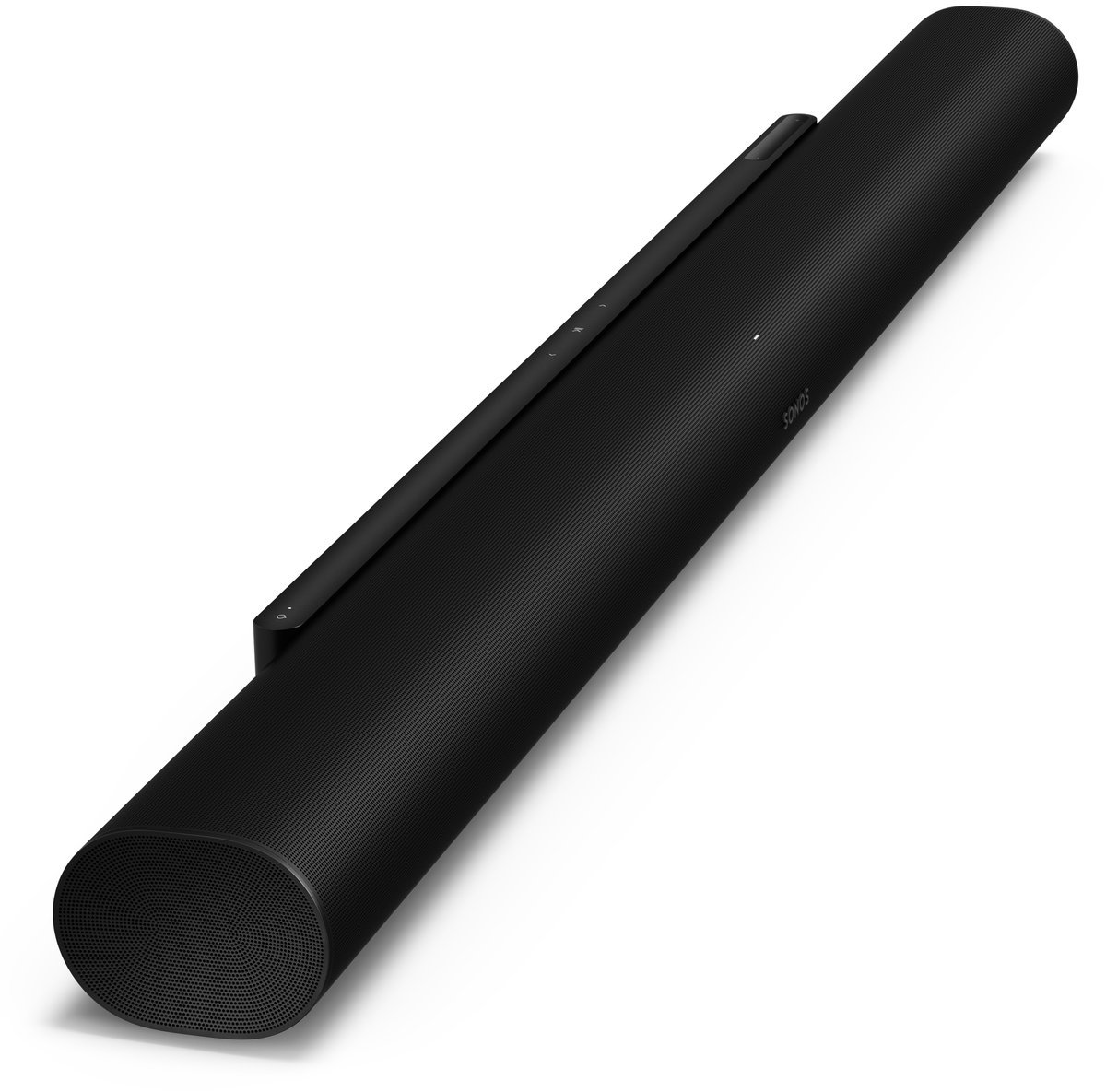

Sonos Arc Ultra
The soundbar we'd recommend to the most people. Sonos' flagship delivers 9.1.4-channel Dolby Atmos from a single cabinet, with 14 drivers driven by 15 Class-D amplifiers, including the new Sound Motion woofer that Sonos says roughly doubles the bass of the original Arc, and it slots into the best whole-home audio ecosystem in the business.
- One cable setup: a single HDMI eARC connection handles audio and TV-remote volume control via HDMI-CEC.
- The Sound Motion woofer gives the strongest bass of any single bar here, and the bar still pairs with a Sonos Sub later.
- Expands wirelessly with a Sonos Sub and Era surrounds, and streams over Wi-Fi 6, Bluetooth 5.3 and AirPlay 2.
Important limitation: No DTS:X support, so Blu-ray collectors with DTS-heavy discs lose height/surround metadata. Only one HDMI port, so devices must connect through the TV. And true bass needs the optional Sub; the built-in woofer is impressive for a bar but not a dedicated subwoofer. At 46+ inches wide, check your TV stand first.
- Channels: 9.1.4 (virtual: height and surround effects via up-firing, side-firing and processing)
- Drivers: 14 total (7 tweeters, 6 midrange drivers, 1 Sound Motion woofer); 15 Class-D amplifiers
- HDMI: 1× HDMI eARC (2.1); HDMI-CEC for TV remote control
- Finish: Black
Best for: Living rooms where one bar has to do everything (movies, music, streaming), and buyers who may want to add a sub or surrounds later rather than all at once. Music listeners benefit especially: Sonos' ecosystem and tuning make this the best-sounding single bar for stereo music in the guide.
Verdict: The soundbar we'd recommend to the most people. Sonos' flagship delivers 9.1.4-channel Dolby Atmos from a single cabinet, with 14 drivers driven by 15 Class-D amplifiers, including the new Sound Motion woofer that Sonos says roughly doubles the bass of the original Arc, and it slots into the best whole-home audio ecosystem in the business.
The Arc Ultra's connectivity is deliberately minimal: a single HDMI eARC port, Wi-Fi 6 and Bluetooth 5.3. Everything else goes through your TV's inputs. That simplicity is the point: one cable handles audio and TV-remote volume control via HDMI-CEC, but it means the Arc Ultra is not the bar for someone who wants to plug a console and a Blu-ray player directly into the soundbar. If your TV is short on HDMI inputs, check that before you buy.
Key specifications (per Sonos and authorized retailers): - Channels: 9.1.4 (virtual: height and surround effects via up-firing, side-firing and processing) - Drivers: 14 total (7 tweeters, 6 midrange drivers, 1 Sound Motion woofer); 15 Class-D amplifiers - HDMI: 1× HDMI eARC (2.1); HDMI-CEC for TV remote control - Wireless: Wi-Fi 6, Bluetooth 5.3, AirPlay 2, Spotify Connect - Audio formats: Dolby Atmos, Dolby TrueHD, Dolby Digital Plus, Dolby Digital (no DTS support, so Atmos content comes via Dolby formats) - Room tuning: Trueplay via the Sonos app - Expandability: pairs wirelessly with Sonos Sub / Sub Mini and Era 100 / Era 300 for true surround - Dimensions: 46.38 × 2.95 × 4.35 in; 13.01 lb; black finish
Who it's for: Living rooms where one bar has to do everything (movies, music, streaming), and buyers who may want to add a sub or surrounds later rather than all at once. Music listeners benefit especially: Sonos' ecosystem and tuning make this the best-sounding single bar for stereo music in the guide.
Limitations, honestly: No DTS:X support, so Blu-ray collectors with DTS-heavy discs lose height/surround metadata. Only one HDMI port, so devices must connect through the TV. And true bass needs the optional Sub; the built-in woofer is impressive for a bar but not a dedicated subwoofer. At 46+ inches wide, check your TV stand.
Sony BRAVIA Theater Bar 9: Best for Sony TV Owners



Sony BRAVIA Theater Bar 9
Sony's flagship single bar takes the virtual-surround approach to its limit: 13 speaker units and 360 Spatial Sound Mapping, which generates phantom speakers around the room from one cabinet. Its standout feature is ecosystem-specific: paired with a compatible BRAVIA TV, Acoustic Center Sync makes the TV itself the center channel, anchoring dialogue to the screen in a way no standalone bar can fake.
- For gamers it's the strongest pick in this guide: the HDMI 2.1 input supports 4K/120Hz, VRR, ALLM and Dolby Vision passthrough, and it's compatible with BRAVIA TV features for PS5 like Auto HDR Tone Mapping.
- It supports both Dolby Atmos and DTS:X, and IMAX Enhanced.
Important limitation: No optical input, so TVs without HDMI ARC/eARC can't use it at all. The single HDMI input means one external device through the bar; everything else goes through the TV. It's also the widest bar here at over 51 inches, best under 65-inch-plus TVs. The subwoofer and rears that complete the system cost extra.
- Channels: 13 (virtual, via 360 Spatial Sound Mapping)
- HDMI: 1× HDMI 2.1 in, 1× HDMI eARC/ARC out; 4K/120, 8K passthrough, VRR, ALLM, Dolby Vision
- Optical: none: optical and 3.5mm legacy inputs are omitted
Best for: Sony BRAVIA TV owners who'll use Acoustic Center Sync, and gamers who want full HDMI 2.1 feature passthrough to a PS5 or Xbox Series X.
Verdict: Sony's flagship single bar takes the virtual-surround approach to its limit: 13 speaker units and 360 Spatial Sound Mapping, which generates phantom speakers around the room from one cabinet. Its standout feature is ecosystem-specific: paired with a compatible BRAVIA TV, Acoustic Center Sync makes the TV itself the center channel, anchoring dialogue to the screen in a way no standalone bar can fake.
For gamers it's the strongest pick in this guide: the HDMI 2.1 input supports 4K/120Hz, VRR, ALLM and Dolby Vision passthrough, and it's compatible with BRAVIA TV features for PS5 like Auto HDR Tone Mapping. It supports both Dolby Atmos and DTS:X, and IMAX Enhanced.
Key specifications (per Sony documentation and authorized retailers): - Channels: 13 (virtual, via 360 Spatial Sound Mapping) - HDMI: 1× HDMI 2.1 in, 1× HDMI eARC/ARC out; 4K/120, 8K passthrough, VRR, ALLM, Dolby Vision - Optical: none: optical and 3.5mm legacy inputs are omitted - Wireless: Bluetooth 5.2, Wi-Fi, AirPlay 2, Spotify Connect - Audio formats: Dolby Atmos, DTS:X, Dolby TrueHD, DTS-HD Master Audio - Expandability: optional wireless subwoofer and rear speakers sold separately - Dimensions: 51.18 × 2.52 × 4.45 in; 12.1 lb
Who it's for: Sony BRAVIA TV owners who'll use Acoustic Center Sync, and gamers who want full HDMI 2.1 feature passthrough to a PS5 or Xbox Series X.
Limitations, honestly: No optical input, so TVs without HDMI ARC/eARC can't use it at all. The single HDMI input means one external device through the bar; everything else goes through the TV. It's also the widest bar here at over 51 inches, best under 65-inch-plus TVs. The subwoofer and rears that complete the system cost extra.
Sonos Beam (Gen 2): Best Compact Soundbar



Sonos Beam (Gen 2)
The right answer when space or budget says no to the Arc Ultra. At 25.6 inches wide, the Beam Gen 2 is a genuine upgrade for bedrooms, offices and smaller living rooms: 5.0 channels with virtual Dolby Atmos, HDMI ARC/eARC, and the same Sonos app, Trueplay tuning and ecosystem expandability as its bigger sibling.
- Virtual Dolby Atmos and 5.0 channels in a 25.6-inch cabinet that fits under most TVs.
- HDMI ARC/eARC connection, with the optical audio adapter included for older TVs.
- The same Sonos app, Trueplay tuning and expandability (Sub Mini, Era surrounds) as the flagship Arc Ultra.
Important limitation: Virtual Atmos from a compact bar is a subtle effect, not the height sensation of the flagships. No Bluetooth, so music streaming goes over Wi-Fi/AirPlay only. No HDMI input for external devices; and like the Arc Ultra, bass is polite without the optional Sub Mini.
- Channels: 5.0 (virtual Dolby Atmos via processing; no up-firing drivers)
- Drivers: 4 mid-woofers, 1 tweeter, 3 passive radiators; 5 Class-D amplifiers
- HDMI: 1× HDMI ARC/eARC; optical connection via included optical audio adapter
- Finish: Black
Best for: Secondary rooms, apartments and TVs up to about 55 inches where a full-size bar would dominate. Buyers who want into the Sonos ecosystem at a lower entry point.
Verdict: The right answer when space or budget says no to the Arc Ultra. At 25.6 inches wide, the Beam Gen 2 is a genuine upgrade for bedrooms, offices and smaller living rooms: 5.0 channels with virtual Dolby Atmos, HDMI ARC/eARC, and the same Sonos app, Trueplay tuning and ecosystem expandability as its bigger sibling.
Key specifications (per Sonos and authorized retailers): - Channels: 5.0 (virtual Dolby Atmos via processing; no up-firing drivers) - Drivers: 4 mid-woofers, 1 tweeter, 3 passive radiators; 5 Class-D amplifiers - HDMI: 1× HDMI ARC/eARC; optical connection via included optical audio adapter - Wireless: Wi-Fi 5 (802.11ac), AirPlay 2; no Bluetooth - Audio formats: Dolby Atmos, Dolby Digital Plus, Dolby TrueHD - Expandability: Sub Mini / Sub, Era surrounds - Dimensions: 25.6 × 2.7 × 3.9 in; 6.2 lb
Who it's for: Secondary rooms, apartments and TVs up to about 55 inches where a full-size bar would dominate. Buyers who want into the Sonos ecosystem at a lower entry point.
Limitations, honestly: Virtual Atmos from a compact bar is a subtle effect, not the height sensation of the flagships. No Bluetooth, so music streaming goes over Wi-Fi/AirPlay only. No HDMI input for external devices; and like the Arc Ultra, bass is polite without the optional Sub Mini.
Samsung HW-S60D: Best Value Mid-Range


Samsung HW-S60D
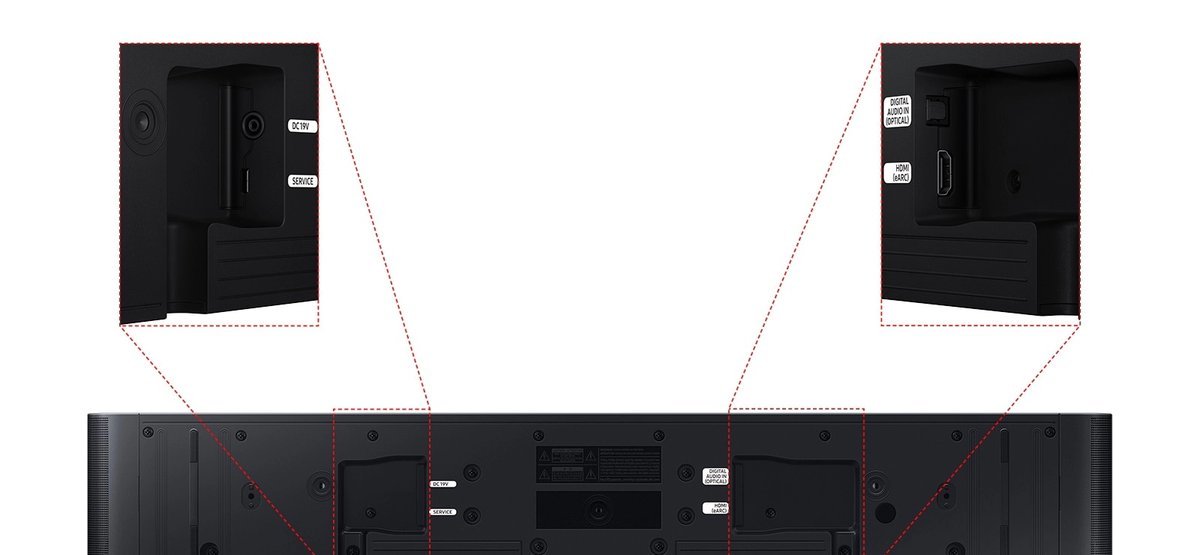
The smartest money in the middle of the market. Samsung's S-series all-in-one delivers 5.0 channels with wireless Dolby Atmos and DTS Virtual:X in a slim 26.3-inch cabinet, with built-in woofers so there's no subwoofer box to place. HDMI eARC, optical, Bluetooth 5.2 and Wi-Fi cover every common connection, and Q-Symphony, SpaceFit Sound Pro and Alexa built-in round out a feature list that embarrasses bars costing more.
- 5.0 channels with wireless Dolby Atmos and DTS Virtual:X, and built-in woofers, so there is no subwoofer box to place.
- Q-Symphony pairs with Samsung TVs, and SpaceFit Sound Pro calibrates the sound to your room.
- HDMI eARC, optical, Bluetooth 5.2 and Wi-Fi cover every common connection.
Important limitation: No HDMI input, so external devices route through the TV. DTS is virtual (DTS Virtual:X) rather than discrete DTS:X. The built-in woofers are good for a slim bar but won't pressurize a large room, so plan on adding the wireless sub if bass matters to you.
- Channels: 5.0 (7 speakers, built-in woofers)
- HDMI: 1× HDMI eARC out (no HDMI input); HDMI-CEC
- Optical: 1× digital audio (optical) input
Best for: Buyers who want a real step up in dialogue clarity, Atmos and streaming, without a subwoofer box or a flagship budget. Pairs naturally with Samsung TVs via Q-Symphony but works with any TV.
Verdict: The smartest money in the middle of the market. Samsung's S-series all-in-one delivers 5.0 channels with wireless Dolby Atmos and DTS Virtual:X in a slim 26.3-inch cabinet, with built-in woofers so there's no subwoofer box to place. HDMI eARC, optical, Bluetooth 5.2 and Wi-Fi cover every common connection, and Q-Symphony, SpaceFit Sound Pro and Alexa built-in round out a feature list that embarrasses bars costing more.
Key specifications (per Samsung spec sheet): - Channels: 5.0 (7 speakers, built-in woofers) - HDMI: 1× HDMI eARC out (no HDMI input); HDMI-CEC - Optical: 1× digital audio (optical) input - Wireless: Bluetooth 5.2, Wi-Fi, AirPlay 2, Chromecast, Spotify Connect, Tidal Connect; wireless Dolby Atmos - Audio formats: Dolby Atmos, Dolby TrueHD, Dolby Digital Plus, DTS Virtual:X, DTS 5.1 - Expandability: wireless surround-ready (compatible with Samsung wireless rear speaker kit); wireless subwoofer can be added - Features: Q-Symphony, SpaceFit Sound Pro, Game Mode Pro, Active Voice Analyzer, Night Mode - Dimensions: 26.3 × 2.4 × 4.1 in; 6 lb
Who it's for: Buyers who want a real step up in dialogue clarity, Atmos and streaming, without a subwoofer box or a flagship budget. Pairs naturally with Samsung TVs via Q-Symphony but works with any TV.
Limitations, honestly: No HDMI input, so external devices route through the TV. DTS is virtual (DTS Virtual:X) rather than discrete DTS:X. The built-in woofers are good for a slim bar but won't pressurize a large room, so plan on adding the wireless sub if bass matters to you.
Buying Guide: How to Choose a Soundbar for Your TV
Match the bar to the room first
The number-one soundbar buying mistake is shopping the spec sheet instead of the room. A discrete 11.1.4 system in a 12×14-foot apartment wastes its rear and height channels: at short viewing distances they collapse into the front bar and you can't hear them as separate sources. A 2.0 budget bar in a great room with 14-foot ceilings leaves movies feeling small. Rough guide:
- Bedroom or office (under ~10 ft viewing distance): compact 3.1 or 5.0 bar, no rears needed. Sonos Beam Gen 2.
- Typical living room (10–18 ft): 3.1–5.1 bar; rear surrounds start earning their keep. Sonos Arc Ultra, Samsung HW-S60D, Sony BRAVIA Theater Bar 9.
- Large or open-plan room (18 ft+): a full 5.1.4-style package with discrete rears and a separate sub, or a flagship bar expanded with a sub and wireless surrounds.
When in doubt, size down. A great 5.0 bar beats a misconfigured 11.1.4 system every time.
Connectivity: HDMI eARC vs ARC vs optical
This is the section that actually decides whether your soundbar works with your TV, so read it carefully.
- HDMI eARC (enhanced Audio Return Channel): the modern standard. One cable carries audio from TV to bar, supports lossless formats (Dolby TrueHD, full-quality Dolby Atmos), and lets your TV remote control the bar's volume via HDMI-CEC. Required for the best Atmos quality.
- HDMI ARC (the older version): same single-cable convenience but limited bandwidth, carrying compressed Dolby Digital/Atmos at best, no lossless TrueHD. Fine for streaming apps; a bottleneck for Blu-ray.
- Optical (TOSLINK): the universal fallback. Works with virtually any TV made in the last 20 years, but limited to compressed stereo/5.1, with no Atmos and no lossless audio. It also can't carry volume commands, so you'll juggle two remotes unless the bar learns your TV remote.
Check your TV's ports before buying. If your TV has HDMI eARC, buy a bar with HDMI eARC. If it only has optical (common on older or very cheap TVs), every pick in this guide except the Sony BRAVIA Theater Bar 9 can still connect, the Sonos bars via their optical adapter.
Channel numbers, decoded
"5.1.4" reads as: 5 = main horizontal channels (left, center, right, two surrounds), 1 = subwoofer channel, 4 = height/Atmos channels. Two kinds exist:
- Discrete systems have physical speakers for the rears and heights in separate boxes. This is real surround.
- Virtual systems (Sonos Arc Ultra, Sony Bar 9, Beam Gen 2) simulate surround and height with processing and angled drivers in one cabinet. Good ones are convincing in average rooms; they can't match discrete rears.
For dialogue clarity specifically, a dedicated center channel (or a bar with a center driver) matters more than the channel count. Every pick here has one.
Dolby Atmos: real vs virtual
True Atmos uses height information; how a bar reproduces it varies. Discrete systems bounce sound off the ceiling with up-firing drivers. Virtual systems approximate it with processing. Both need Atmos-encoded content to matter: most Netflix, Disney+ and Apple TV+ originals have it; broadcast TV largely doesn't. Don't pay for Atmos if you mostly watch cable news and YouTube, and do check that your bar actually decodes the formats your content uses (the Sonos bars skip DTS entirely).
TV ecosystem matching
Cross-brand features are real and worth considering:
- Samsung TV + Samsung bar: Q-Symphony plays the TV speakers and soundbar together; SpaceFit auto-calibrates.
- Sony BRAVIA TV + Sony bar: Acoustic Center Sync uses the TV as the center channel, the best dialogue upgrade in this guide.
- Apple TV / iPhone household: Sonos bars with AirPlay 2 and Trueplay integrate most smoothly.
None of these are requirements (every bar works with every TV over HDMI), but matching brands buys you genuinely useful extras.
Subwoofers and expandability
Bass is physics: small drivers in a slim bar can't move much air. If movies matter, plan for a subwoofer, either included in a multi-box package, added later (every pick in this guide can add a wireless subwoofer), or not at all (budget reality on the cheapest bars, some of which have no sub output). Buying an expandable bar now and adding the sub later is a legitimate strategy, and it's exactly what the Sonos ecosystem is designed for.
Gaming features
If a PS5 or Xbox Series X is in the chain, HDMI 2.1 passthrough with 4K/120Hz, VRR and ALLM keeps the signal path clean. Of these picks, the Sony BRAVIA Theater Bar 9 (one HDMI 2.1 input) passes these through; the Sonos and Samsung bars expect everything to connect through the TV, which is fine as long as your TV has the ports.
Types of Soundbars
- Single all-in-one bars (Sonos Arc Ultra, Sony Bar 9, Beam Gen 2, Samsung HW-S60D): one cabinet, everything processed internally. Cleanest look, simplest setup.
- Bar + wireless subwoofer bundles: add real bass without wires between the boxes. (Some packages include the sub; the picks here offer it as an add-on.)
- Full surround packages: bar + sub + wireless rears sold as one system. Closest to a traditional home theater, minus the AV receiver.
- TV + soundbar packages: some retailers and manufacturers bundle a TV with a matching soundbar at a combined price. These can be good value when you're buying both anyway, but verify the soundbar model in the bundle independently, because bundles sometimes pair a great TV with a mediocre bar.
Soundbar vs Alternatives: Honest Comparisons
Soundbar vs a full AV receiver + speakers: A receiver with separate speakers still wins on absolute sound quality, upgradeability and format support, and costs more, needs more space, and demands more setup. Soundbars win on simplicity. If you'll never run speaker wire, stop comparing and buy the soundbar.
Soundbar vs TV speakers: Not close. Even a budget 2.0 bar is a large upgrade in dialogue clarity and dynamics. This is the highest-value audio purchase in home theater.
HDMI eARC vs optical (quick reference):
| HDMI eARC | Optical | |
|---|---|---|
| Dolby Atmos (lossless) | Yes | No |
| Dolby TrueHD / DTS-HD | Yes | No |
| Compressed 5.1 / Dolby Digital | Yes | Yes |
| TV remote controls volume | Yes (CEC) | No |
| Works with 15-year-old TVs | Usually not | Yes |
Should you buy a TV and soundbar as a package? Only if the bundle's soundbar is a model you'd buy on its own. Check the exact model number in the bundle against this guide: a flagship TV bundled with an entry-level bar is a common way to move mediocre audio inventory.
Common Mistakes to Avoid
- Buying for the spec sheet, not the room. An 11.1.4 system in a small apartment is money burned on channels you'll never hear as separate sources.
- Not checking your TV's ports. The Sony BRAVIA Theater Bar 9 has no optical input; if your older TV lacks HDMI ARC, that bar is a paperweight for you.
- Blocking up-firing drivers. Atmos bars with up-firing speakers need a clear ceiling path, and tucking the bar deep inside a closed cabinet kills the height effect.
- Expecting miracles from "virtual" Atmos. Virtual processing is genuinely good now, but it's an approximation. If height effects are the priority, a discrete multi-box system is the honest route.
- Assuming one HDMI port is enough. The Sonos bars have a single HDMI eARC port and no HDMI inputs. Count your devices and your TV's inputs before buying.
- Ignoring the center channel. Dialogue clarity comes from the center, not the channel total. A budget 2.0 bar has no discrete center channel, which is fine for the price, but know what you're giving up.
- Sizing the bar wrong for the TV. A 48-inch bar under a 43-inch TV looks absurd; a 26-inch bar under a 75-inch TV looks lost. Match widths roughly; within about 6 inches either way is fine.
- Paying for features your content doesn't use. No Atmos content in your viewing diet? A great 5.0 or 3.1 bar will make you happier than a mediocre "Atmos" bar.
Bad Advice We Found Online, Corrected
While researching this guide we checked the current top results for "best soundbar for TV" and found claims worth flagging, because they could cost you money:
- "The Sonos Arc Ultra has two HDMI 2.1 inputs." False. The Arc Ultra has a single HDMI eARC port and no HDMI inputs, consistent across Sonos documentation and authorized retailers. Pages repeating the two-input claim appear to have generated their specs rather than read them. If you buy the Arc Ultra expecting to plug a console directly into it, you'll be disappointed.
- AI-generated roundups with invented specs. Several auto-generated "best soundbar" pages list contradictory figures for the same product (we saw two different total-wattage numbers and conflicting weights for the Samsung HW-Q990F across such pages). Treat any spec that appears on only one low-quality page as unverified.
- "Buy by wattage." Wattage numbers on soundbars are nearly meaningless for comparing across brands because manufacturers measure differently, and a well-designed 5.0 bar will sound better than a loud, harsh high-wattage one. Buy by channel layout, connectivity and room fit, not watts.
- Outdated flagship recommendations. Some ranking pages still push previous-generation flagships (like the Samsung HW-Q990D) as current without noting that the Q990F superseded it with a redesigned subwoofer and added streaming protocols. Check the model year, not just the model line.
FAQs
Aim for a bar roughly 40–50 inches wide to visually match a 55-inch TV (about 48 inches wide). The Sonos Arc Ultra (46.4 in) sits well under one, and the wider Sony BRAVIA Theater Bar 9 (51.2 in) suits a 55-inch or larger set. A few inches smaller is fine; much smaller looks lost.
If your TV and bar both support eARC and you watch Atmos content (streaming originals, Blu-ray), eARC is worth it: it's the only connection that carries lossless Dolby TrueHD/Atmos. For broadcast TV, cable and YouTube, standard ARC is audibly identical. Optical is the fallback when neither exists.
Not mandatory, but it's the biggest single upgrade after the bar itself, since slim bars physically can't produce deep bass. Some multi-box packages include one; every pick in this guide lets you add a wireless subwoofer later.
Yes, use the optical input, which nearly all older TVs have. Of these picks, only the Samsung HW-S60D has a built-in optical input; the Sonos bars connect optically via an adapter, and the Sony BRAVIA Theater Bar 9 has no optical input at all. Note that optical can't carry Atmos or lossless audio, and your TV remote won't control the bar's volume over optical.
It works, but HDMI is better for movies: Bluetooth can introduce slight audio-video sync lag, and it's limited to compressed stereo. Use HDMI ARC/eARC for the TV connection and reserve Bluetooth for music streaming from your phone.
No. Only bars built for it, with up-firing drivers or Atmos decoding, support it; check the spec sheet rather than assuming. Also note that the Sonos bars in this guide don't decode DTS formats, so DTS-encoded Blu-rays lose their surround metadata.
Separate speakers with an AV receiver still win on sound quality and upgradeability. A soundbar wins on simplicity, space and cost. If you'll never run speaker wire or place rear speakers, the soundbar is the right choice, and a discrete multi-box system closes much of the gap.
Centered directly below (or above) the TV, with nothing blocking the front drivers, and not tucked deep inside a closed cabinet, because up-firing Atmos drivers need a clear path to the ceiling. Wall-mounting is fine as long as the bar sits close to the TV's bottom edge.
Final Verdict
For most buyers, the Sonos Arc Ultra is the best soundbar for a TV: the most convincing single-bar surround, the best music performance, and an ecosystem that lets you add a sub or surrounds later instead of all at once. Sony TV owners and gamers get the most from the BRAVIA Theater Bar 9, small rooms are well served by the Beam Gen 2, and the Samsung HW-S60D is the value sweet spot in the middle of the market.
Whichever you choose, check two things before you buy: that your TV has the right port (HDMI eARC ideally, optical at minimum), and that the bar fits your room, not just your TV stand.
Final Recommendations
Best Overall Soundbar: Sonos Arc Ultra: 9.1.4 Atmos, HDMI eARC, expandable ecosystem
Best for Sony TV Owners: Sony BRAVIA Theater Bar 9: Acoustic Center Sync, 4K/120 passthrough
Best Compact Soundbar: Sonos Beam (Gen 2): 25.6", virtual Atmos, small rooms
Best Value Mid-Range: Samsung HW-S60D: 5.0ch all-in-one, Q-Symphony, expandable
Related Guides
- pairing your soundbar with a home theater receiver setup
- Samsung vs LG TV: which brand pairs best with your soundbar ecosystem
- wireless TV headphones for late-night viewing without disturbing anyone
- best outdoor TVs, where soundbars face very different conditions
- TV wall mounting guide, including soundbar mounting considerations
Specifications verified against manufacturer documentation in October 2026; re-verify availability and current specs before purchase.